
7 security tips for Premium accounts and personal data
Published:
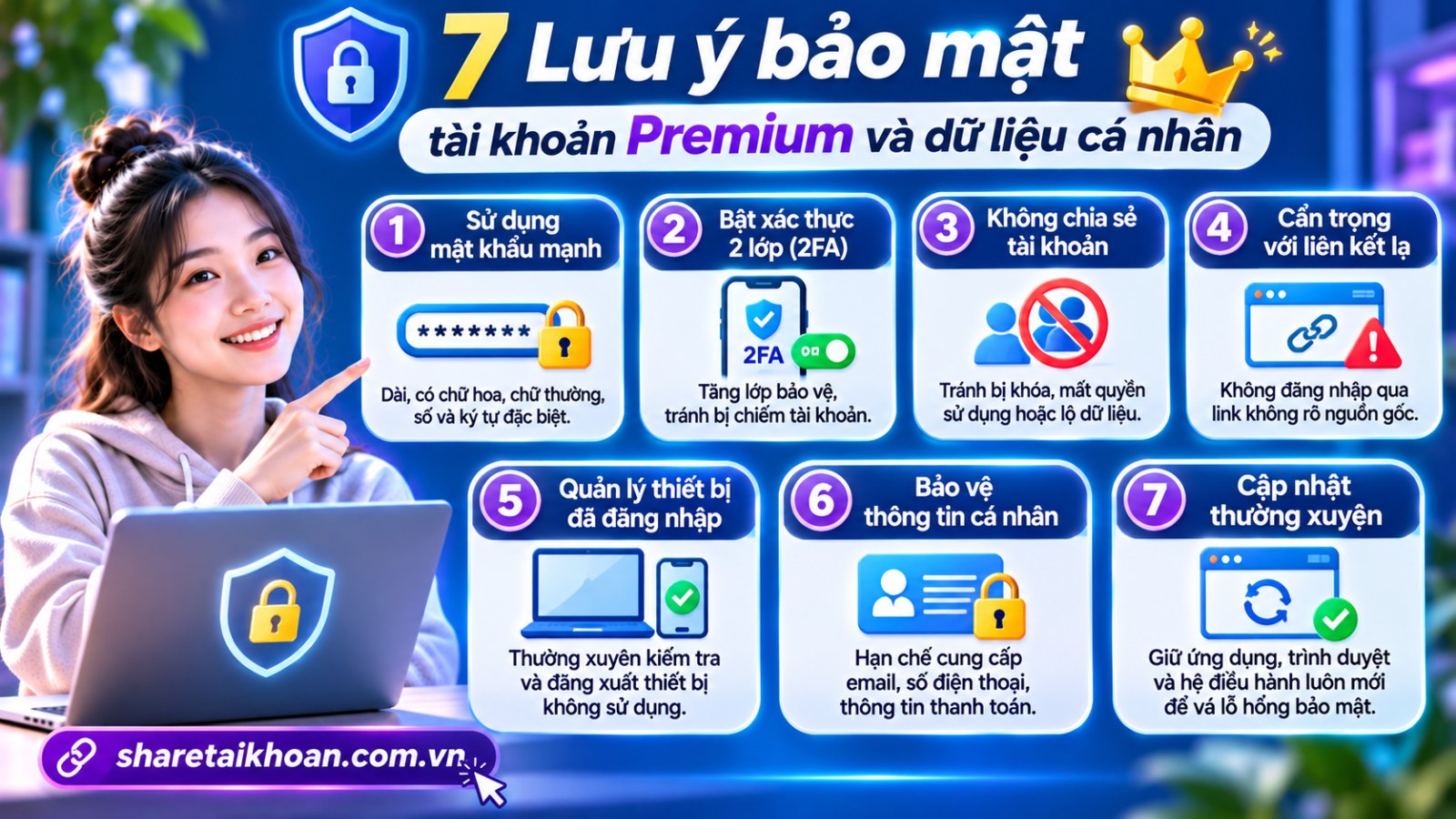
Premium account security is about more than keeping your password secret. You also need to manage devices, uploaded data, and support requests that may be fraudulent. The seven tips below apply to both Private and Shared accounts.
Do not share passwords or verification codes
Passwords and OTP codes are used to verify access. Do not send them in public comments, on social media, or to strangers claiming to be support staff. If the shop’s support process requires a specific piece of information, verify the contact channel before providing it.
Do not reuse the password for your primary email, bank, or other important accounts for a new service. For accounts you are authorized to manage, use a unique password and enable multifactor authentication if the provider supports it.
Limit the amount of sensitive data you upload to your account
Upload only the data needed for the task. Before sending a document to an AI tool or saving a design to the cloud, remove personally identifying information, account numbers, passwords, trade secrets, and customer data unless they are essential.
Especially with Shared accounts, do not treat chat history, file libraries, or storage space as private. Download important work and keep it on a device or in storage that you control.
Check your device before and after signing in
Prioritize personal devices with an up-to-date operating system and browser. Do not sign in on public computers or devices with unfamiliar software. If you must use a device that does not belong to you, do not select the option to remember your login.
After use, sign out according to the service’s instructions and delete any downloaded data from that device if you no longer need it. Simply closing the browser window does not always end the login session.
Recognize fake support messages
Fake messages often create a sense of urgency and ask you to click an unfamiliar link, download software from an unknown source, or send money outside the agreed process. Do not act immediately just because the message has a logo or name that looks like the shop’s.
Open the ShareTaiKhoan website yourself and use the contact channel published there to verify the request. For other services, go directly to the official website or app instead of signing in through a link from a stranger.
Follow the instructions for the plan you purchased
Do not change the email address, password, owner information, or group settings if your plan does not allow it. Do not share the login details for a Shared account with anyone else. Changes outside the instructions may affect other users and the support process.
You should also read the service provider’s terms. Features, device limits, and usage rules may vary by plan or change over time.
Back up your work and important data
Do not keep the only copy of an article, design, video, or research data in an online account. Download the completed version and save it in at least one place you control. For long-term projects, name files by version so they are easier to restore when needed.
Before deleting data from your account, check that the backup opens and contains everything. Backups not only give you more control when switching devices but also reduce the risk of losing data due to a mistaken action.
What to do if you notice anything unusual
If you see a login notification from an unfamiliar device, notice that data has been changed, or cannot access your account, stop using it and record the time, error message, and order number. Do not continue trying to change account details until you know the cause.
Contact ShareTaiKhoan through its official support channel if the issue concerns a plan you purchased. If your personal email or payment account also appears to have been compromised, secure those accounts first and follow the relevant provider’s recovery instructions.
(0 ratings - 0/5)
Buy affordable accounts at ShareTaiKhoan



Compare packages
| Product | Package | Type | Price | |
|---|---|---|---|---|
| ChatGPT Plus | Plus - 1 month | Shared | 149.000₫ | Buy |
| ChatGPT Plus | Plus - 3 months | Shared | 399.000₫ | Buy |
| ChatGPT Plus | Plus - 1 year | Shared | 1.499.000₫ | Buy |
| ChatGPT Plus | Plus - Lifetime | Shared | 4.500.000₫ | Buy |
| Canva | Edu - 1 year | Own account | 150.000₫ | Buy |
| Canva | Edu - Lifetime | Own account | 599.000₫ | Buy |
| Canva | Pro - 1 year | Own account | 299.000₫ | Buy |
| Canva | Pro - 2 years | Own account | 499.000₫ | Buy |
| CapCut | Pro - 1 device - 1 week(s) | Shared | 39.000₫ | Buy |
| CapCut | Pro - 1 device - 1 month | Shared | 89.000₫ | Buy |
| CapCut | Pro - 1 device - 6 months | Shared | 499.000₫ | Buy |
| CapCut | Pro - 1 device - 1 year | Shared | 799.000₫ | Buy |
Related products

Other articles
- Elicit Pro: Features, intended users and tips for choosing an account
- What is a Premium account? How to choose a plan that suits your needs
- How to receive and check your Premium account after purchase
- What Is KeywordTool.io? A Guide to SEO Keyword Research in 2026
- What Is Gamma AI? How to Create AI Slides & Compare Gamma Pro Plans in 2026
- What Is vidIQ? A Guide to Using vidIQ Boost & Max for YouTube SEO
- What Is Nexlev? A Guide to Finding YouTube Niches with Niche Finder
Comments (0)
Sign in or register to comment.
No comments yet.