
Elicit Pro: Features, intended users and tips for choosing an account
Published:
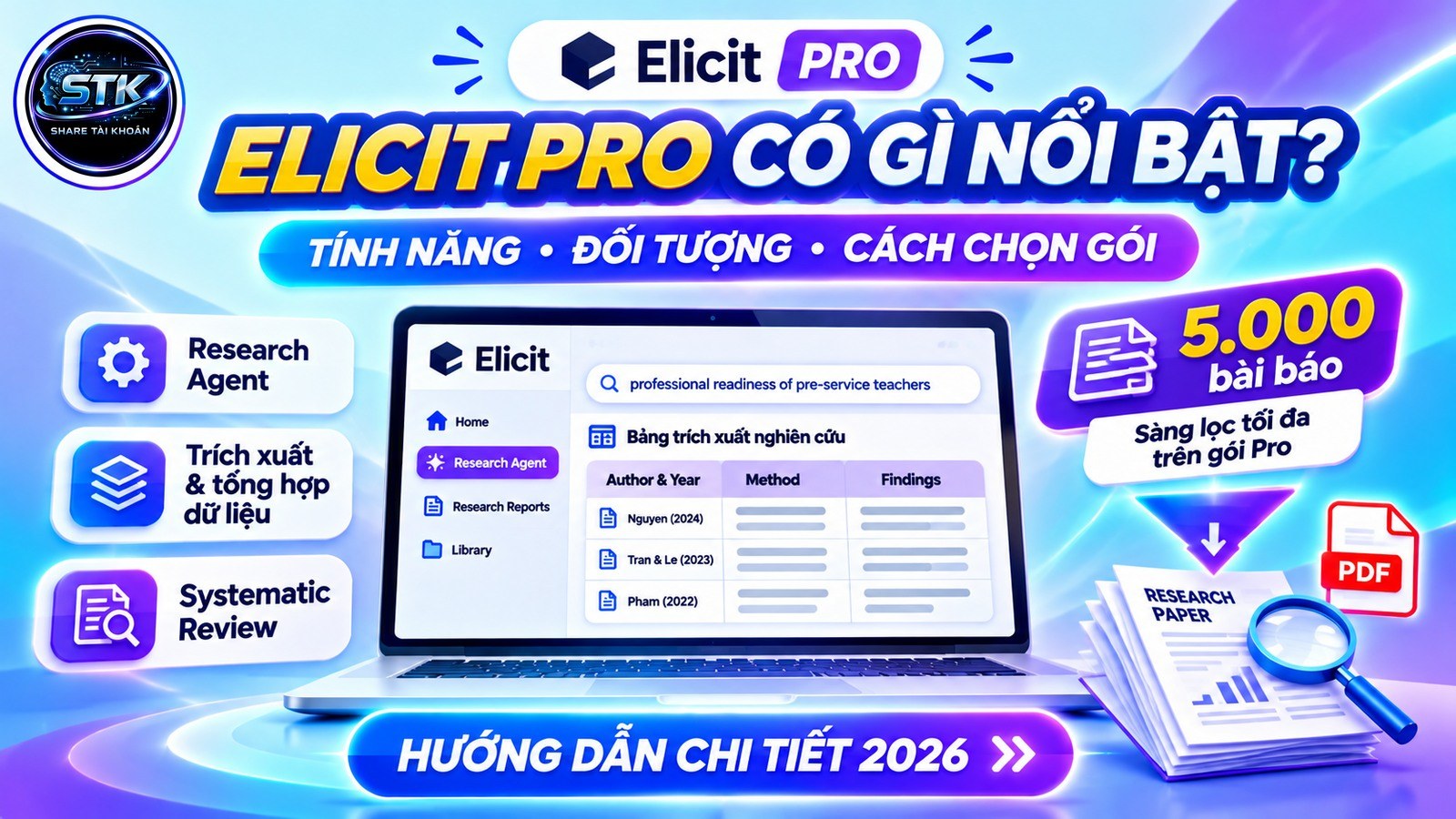
Elicit Pro: Standout features, who it's for, and tips for choosing an account
Are you working on an undergraduate thesis, a master's thesis, or a scientific research project and struggling to search, read, classify, and synthesize hundreds of papers? Manually processing research materials not only takes a great deal of time but also requires accuracy in citations, methodology, and data.
Elicit Pro is Elicit AI's advanced paid plan, developed to support research tasks such as searching for literature, extracting information, synthesizing evidence, and conducting a Systematic Literature Review.
In particular, Elicit Pro offers a screening workflow for up to 5,000 papers in a systematic review, supports extracting multiple data fields, generating reports with references, and provides API access for researchers and developers.
So What are Elicit Pro's standout features? Who should use Elicit Pro? Is the Pro plan worth buying over Elicit Basic or Plus, and what should you consider when choosing an account?
Let's ShareTaiKhoan Learn more in the article below.
What Is Elicit Pro?
Elicit Pro is Elicit's premium subscription plan, offered by an AI-powered scientific research assistant platform.
Elicit is designed to support tasks related to academic literature searches, research analysis, and evidence synthesis.
Unlike general-purpose AI chatbots, Elicit focuses on structured research workflows and the ability to trace information to its sources.
Elicit Pro expands these benefits with higher usage limits and specialized research tools.
Notable capabilities include:
Search a database of more than 138 million scientific papers.
Use Elicit Research Agent with higher usage limits.
Create Research Reports from multiple data sources.
Conduct a Systematic Literature Review.
Screen up to 5,000 papers in each systematic review.
Extract data using multiple custom criteria.
View the evidence supporting AI-generated findings.
Set up Research Alerts.
Access the Elicit API to integrate it into your research workflow.
Elicit Pro is especially suitable for people who regularly conduct in-depth research and need to analyze large volumes of material.
Official website: https://elicit.com
Elicit Pro’s Key Features
2.1. Research Agent – AI Research Assistant
Research Agent is one of Elicit’s core features.
The tool lets users enter a research question, find relevant materials, and ask AI to carry out the next steps of the analysis.
For example:
"What are the key factors influencing professional readiness among pre-service English teachers?"
Elicit Research Agent can help find relevant studies, then create comparison tables and synthesize findings.
Notably, as of 30/09/2026, features such as Find Papers, Extract Data, and Chat with Papers, which were previously available separately, have been integrated into Research Agent.
This allows users to complete multiple research steps in a single work session without constantly switching between tools.
2.2. Systematic Literature Review
This is one of the key differences between Elicit Pro and the Basic plan.
A Systematic Literature Review is a research synthesis method with a clearly defined process, including developing a search strategy, setting selection criteria, screening, and data extraction.
Elicit Pro provides specialized workflows to support:
Define the research question and scope.
Compile relevant papers.
Screen titles and abstracts.
Screen full texts when needed.
Extract data from selected studies.
Create research reports and supporting documents for the PRISMA workflow.
According to Elicit documentation, the Pro plan can add up to 5.000 papers to a systematic review.
However, this is a screening capacity limit for a single workflow; it does not mean that the account can be used to access 5.000 papers for free or without monthly limits.
Each workflow still uses part of the subscription plan’s usage limits.
2.3. In-Depth Research Data Extraction
When writing a Literature Review, researchers often need to create a summary table of related works.
Elicit Pro supports extracting specific information from multiple studies.
For example:
Criteria | Extracted content |
|---|---|
Author & Year | Author and publication year |
Research Aim | Research objectives |
Participants | Study population and sample size |
Methodology | Research method |
Instruments | Data collection tool |
Key Findings | Key results |
Limitations | Research limitations |
According to the current benefits table, Elicit Pro allows you to add up to 20 columns to a table in a single operation.
Users can open a data cell to check the relevant evidence in the document, reducing the risk of using inaccurate extracted results.
2.4. Research Reports – AI-Powered Research Reports
Elicit Pro supports creating Research Reports based on research questions and the data sources found.
Reports can synthesize key findings, analyze related studies, and provide a list of references.
According to the Elicit pricing table, the Pro plan supports reports drawing on up to 135 data sources.
Users can export supported reports as PDF or Word files for further review and editing.
However, AI-generated reports should not be used directly as academic conclusions without independent verification.
2.5. Research Alerts – Track New Research
Elicit Pro allows users to set up up to 10 personalized Research Alerts, according to the plan details.
This feature is suitable for researchers who want to track new papers in their field of interest.
In addition to Alerts, Elicit has also developed Routines through Research Agent to support recurring research tasks on a schedule.
These features are useful when you are following a research topic over several months or years.
2.6. Elicit API – Integrate Research Tools
Elicit Pro provides API access for developers and researchers who need automation.
The API supports tasks such as searching for literature, generating reports, and running systematic review workflows programmatically.
Elicit also supports MCP for connecting compatible AI tools.
However, API access does not mean that all API operations are free or unlimited. Users should separately check the usage policy, limits, and API pricing.
How Does Elicit Pro Compare with Elicit Basic and Plus?
Elicit currently offers Basic, Plus, Pro, Scale, and Enterprise plans.
Below is a comparison table highlighting the key differences.
Criteria | Basic | Plus | Pro |
|---|---|---|---|
Price | Free | 11 USD/month when billed annually | 39 USD/month when billed annually |
Search for papers | Yes | Yes | Yes |
Research Agent | Low limits | Standard limits | Higher limits |
Research Reports | Limits | Yes | Expanded limits |
Advanced data export | Limitations | Yes | Yes |
Extraction columns per operation | Limitations | Up to 5 | Up to 20 |
Dedicated Systematic Review | No | Check current plan access | Yes |
Screen up to 5,000 papers/reviews | No | No | Yes |
Personalized Research Alerts | Limits | Depending on the plan | Up to 10 |
API | No | No | Yes |
The Basic plan is suitable for people who are new to the tool.
The Plus plan is suitable for people who regularly search, analyze, and synthesize literature but do not yet need a large-scale systematic review workflow.
The Pro plan is designed for in-depth research needs that require higher limits and specialized features.
Who Is Elicit Pro Suitable For?
4.1. University Students
Students can use Elicit to find literature, develop research reviews, and analyze papers related to their theses.
However, not every student needs the Pro plan.
For projects of moderate scope, users should try Elicit Basic or Plus first.
4.2. Graduate Students
Graduate students often need to process many research papers to develop a theoretical framework and analyze related studies.
Elicit Pro is worth considering if your project requires synthesizing a large number of papers or using a structured screening process.
4.3. Doctoral Candidates
Graduate researchers often need to find, evaluate, and synthesize large volumes of literature.
In particular, if you are conducting a Systematic Literature Review, the Pro plan offers several useful support tools.
However, decisions about selection criteria, evidence quality, and research methods remain the responsibility of the researcher.
4.4. Lecturers and Researchers
Instructors can use Elicit Pro to keep up with new publications, research topics in depth, and create overview reports.
For research groups that need to collaborate on live edits, Scale or Enterprise may be a better fit than Pro.
4.5. Corporate Research Professionals
In fields such as healthcare, science, technology, and market analysis, Elicit can help synthesize information sources to inform decisions.
However, important data still needs to be verified, and the organization’s security requirements must be followed.
Tips for Choosing the Right Elicit Pro Account
5.1. Clearly Identify Your Needs
Before purchasing, determine what tasks you will use Elicit for.
If you mainly search for papers and read their abstracts, the Basic plan may be sufficient.
If you regularly create research tables and export data, Plus is worth considering.
If you need a specialized systematic review process, screening of many studies, and API access, Pro may be a better fit.
5.2. Check the Actual Benefits
Do not rely solely on the name "Elicit Pro" and overlook usage limits.
Check:
Research Agent limits.
Systematic Review access.
Number of papers that can be screened.
Data extraction capabilities.
Number of sources in Research Reports.
Data export feature.
API access.
Renewal and cancellation policies.
5.3. Distinguish Between Personal and Shared Accounts
A personal account is an account managed by the user, with the registered email address and access rights belonging to that individual.
A shared account is an arrangement in which multiple people use the same account or are granted access through a particular mechanism.
For scientific research, users should prioritize a private account, especially when handling unpublished research data.
A shared account may pose risks related to privacy, research history, management rights, and compliance with the publisher’s terms.
5.4. Check the Subscription Duration
If you only need the tool for a short period, such as while developing a proposal or completing a Literature Review, consider which billing cycle best suits your needs.
Do not subscribe for a whole year just because the monthly equivalent is lower if your actual need only lasts a few weeks.
5.5. Check the Support Policy
If you purchase a service through a third party, clarify how activation works, the subscription duration, access rights, how issues are handled, and the refund terms.
Do not provide the seller with your primary email password or two-factor authentication code.
How Much Does Elicit Pro Cost in 2026?
According to the Elicit pricing table checked on 14/11/2026, the reference prices for individuals are as follows:
Plan | Price with annual billing |
|---|---|
Basic | Free |
Plus | 132 USD/year |
Pro | 468 USD/year |
Scale | 1.068 USD/year |
Thus, the converted price of Elicit Pro is 39 USD/month when paying 468 USD for the full year.
In addition, Elicit’s pricing page also displays a Pro configuration at 49 USD/month when billed annually in some cases.
Therefore, the final price should be confirmed directly on the checkout page based on the plan, region, and applicable promotion.
Reference: https://elicit.com/pricing
This is Elicit’s list price, not the price of a service offered by ShareTaiKhoan.
Should You Buy Elicit Pro Just to Write a Literature Review?
The answer depends on the scale of the research.
If you only need to synthesize 10–20 papers, Elicit Basic or Plus may be a better fit.
If you need to screen hundreds or thousands of papers, extract many data variables, and prepare reports using a systematic review process, Pro can significantly reduce manual work.
However, two tasks should be distinguished:
Typical Literature Review: Summarize and analyze related works by topic.
Systematic Literature Review: The overview uses a predefined process for searching, screening, evaluating, and synthesizing evidence.
Not every thesis with a literature review section needs to conduct a systematic review.
Therefore, any upgrade should be based on the requirements of the research methodology, not just the feature name.
Getting Started with Elicit Pro
Step 1: Visit Elicit
Open https://elicit.com and log in.
Step 2: Check the Subscription Plan
Open your account settings and confirm your current plan.
If you use Pro, check your access to the workflows and usage limits.
Step 3: Get Started with Research Agent
Enter a specific research question in English or a supported language.
For example:
"Find empirical studies on professional readiness among pre-service English teachers."
Step 4: Search for and Select Literature
Check the authors’ names, publication year, methods, and relevance of the suggested studies.
Step 5: Extract Data
Ask Elicit to create a table with:
"Author, Year, Research Context, Sample, Methodology, Key Findings, Limitations."
Step 6: Synthesize the evidence
Ask AI to analyze similarities, differences, research limitations, and questions that need further investigation.
Step 7: Check the results
Open the original document and check the figures, citations, methods, and conclusions.
Step 8: Export the data
Use the export options supported by the Pro plan to continue processing in Word, Excel, or document management software.
If you need to conduct a systematic review, you can start with a dedicated workflow and set the selection criteria before running the screening process.
What Are the Advantages and Limitations of Elicit Pro?
Advantages
Elicit Pro supports a structured research process, from searching for and screening papers to extracting and synthesizing data.
The Pro plan also expands capabilities for creating reports, exporting data, keeping up with new publications, and using API integrations.
Limitations
The subscription cost is higher than that of basic plans.
Workflows have usage limits, and not every task can be performed without limits.
Elicit also does not guarantee that it will find all literature in a field or extract all data correctly.
Therefore, users should check the results and also use appropriate academic databases.
Things to Keep in Mind When Using Elicit Pro for Research
Do not cite AI instead of the original source. When using information found by Elicit, check the papers and cite the correct works.
Do not treat AI results as absolutely accurate. Data such as sample size, methods, figures, and conclusions should be cross-checked.
Do not upload sensitive data to an account you do not control. Especially when handling internal research documents or personal information.
Comply with academic regulations. AI use must comply with the policies of the relevant school, organization, or journal.
Do not confuse screening 5,000 papers with unlimited use. This is a workflow capability and remains subject to plan limits and processing configuration.
Frequently Asked Questions About Elicit Pro
Is Elicit Pro free?
No. Elicit Pro is a paid plan. Users can start with the free Elicit Basic plan to try its basic features.
How much does Elicit Pro cost?
The reference price is 39 USD/month when billed annually under one listed configuration. The final price depends on the subscription option and checkout page.
Does Elicit Pro help write Literature Reviews?
Yes. Elicit supports searching, extracting, and synthesizing data for Literature Reviews. However, researchers still need to evaluate the findings, develop their own arguments, and verify sources.
Does Elicit Pro support Systematic Reviews?
Yes. This is one of the Pro plan's specialized features, supporting the screening of up to 5,000 papers per systematic review.
How do Elicit Plus and Pro differ?
Pro has higher usage limits and advanced benefits, including a systematic review workflow, larger extraction tables, Research Alerts, and API access.
Do students need Elicit Pro?
Not necessarily. For typical literature searches or thesis writing, it is best to start with Basic or Plus.
Does Elicit Pro have an API?
Yes. Elicit API is available with Pro, Scale, and Enterprise plans under the current policy.
Should you buy a Shared Elicit Pro account?
For research involving private or unpublished data, it is best to use a personal account. A shared account may affect privacy, management rights, and stability.
Conclusion: Is Elicit Pro Worth Buying?
Elicit Pro is an option worth considering for people conducting in-depth scientific research, especially when screening many papers, extracting structured data, and conducting a Systematic Literature Review.
However, users do not necessarily need to upgrade to Pro if they only need to search for literature and synthesize a few papers.
Before purchasing, assess the volume of research, methodological requirements, subscription duration, and the features you actually need.
Explore AI research tools at ShareTaiKhoan
If you are exploring Elicit Pro or AI tools that support scientific research, you can find guides and service options at ShareTaiKhoan.
Before subscribing, check the account type, access rights, usage limits, subscription duration, and support policy.
Account Sharing | ShareTaiKhoan
Website: https://sharetaikhoan.com.vn
Zalo/WhatsApp: +84 337 018 337
ShareTaiKhoan is an independent service provider and is not Elicit or an official reseller endorsed by Elicit.
References:
Elicit Pricing: https://elicit.com/pricing
Elicit Help Center – Getting Started: https://support.elicit.com
Elicit Help Center – Systematic Reviews in Elicit
Elicit Help Center – Elicit API
Elicit Help Center – Changelog
Updated on 14/11/2026. Prices, limits, and account benefits may change according to the publisher's policies.
(1 ratings - 5/5)
Buy affordable accounts at ShareTaiKhoan

Related products



Other articles
- Elicit AI vs Google Scholar 2026: Which Tool Should You Choose?
- Elicit AI vs Consensus AI 2026: Which research tool should you choose?
- What Is Elicit AI? A Guide to Finding Research Literature
- What is a Premium account? How to choose a plan that suits your needs
- How to receive and check your Premium account after purchase
- 7 security tips for Premium accounts and personal data
- What Is KeywordTool.io? A Guide to SEO Keyword Research in 2026
Comments (0)
Sign in or register to comment.
No comments yet.