
AI in Education 2026: 7 Notable Learning Tools
Published:

AI is changing how students access knowledge and how teachers prepare lessons. Explore 7 notable AI tools in 2026, trends in personalized learning, and ways to use AI effectively and responsibly
AI in Education in 2026: Which Tools Are Students Using?
Updated: 05/11/2026 | Category: Technology News
AI in Education in 2026 is opening up new ways to learn, from explaining concepts and practicing foreign languages to creating review questions, supporting research, and preparing presentations.
Tools such as ChatGPT, Google Gemini, NotebookLM, Canva Education, and Quizlet are increasingly being integrated into learning and teaching activities.
Notably, artificial intelligence is no longer focused solely on providing answers. Many platforms are developing toward personalizing the learning process, asking guiding questions, and helping learners find answers for themselves.
So how is AI changing education in 2026? Which AI tools are suitable for students and teachers? How can we make the most of artificial intelligence without becoming overly dependent on technology?
Let's ShareTaiKhoan explore noteworthy trends and AI tools in education in the article below.
What is AI in education? Why is it attracting growing interest?
AI in education is the application of artificial intelligence to support teaching and learning, research, assessment, and the management of educational activities.
With its ability to process language, analyze information, and generate content, AI can help learners access knowledge in many different ways.
For example, when faced with a difficult math problem, students can ask AI to explain the approach rather than simply give the answer.
Students can use AI to develop research outlines, practice foreign languages, or synthesize information from documents.
Teachers can use AI to prepare lesson ideas, design learning activities, and create review questions.
1.1. How does AI support learning?
Some popular applications include:
Explain difficult concepts.
Create practice questions.
Practice foreign-language conversations.
Summarize and organize materials.
Develop an exam revision plan.
Help prepare presentations.
Create learning materials and illustrative images.
However, AI should play a supporting role only. Teachers, authoritative materials, and independent thinking remain important to the learning process.
1.2. What’s different about educational AI in 2026
One notable change is that many platforms are moving from AI that gives direct answers to AI that guides learning.
Instead of giving the solution straight away, AI can ask questions, provide step-by-step hints, help learners identify what they do not understand, and check their knowledge.
This direction is reflected in ChatGPT's Study Mode and Google Gemini's Guided Learning.
ChatGPT – A versatile AI tool for learning
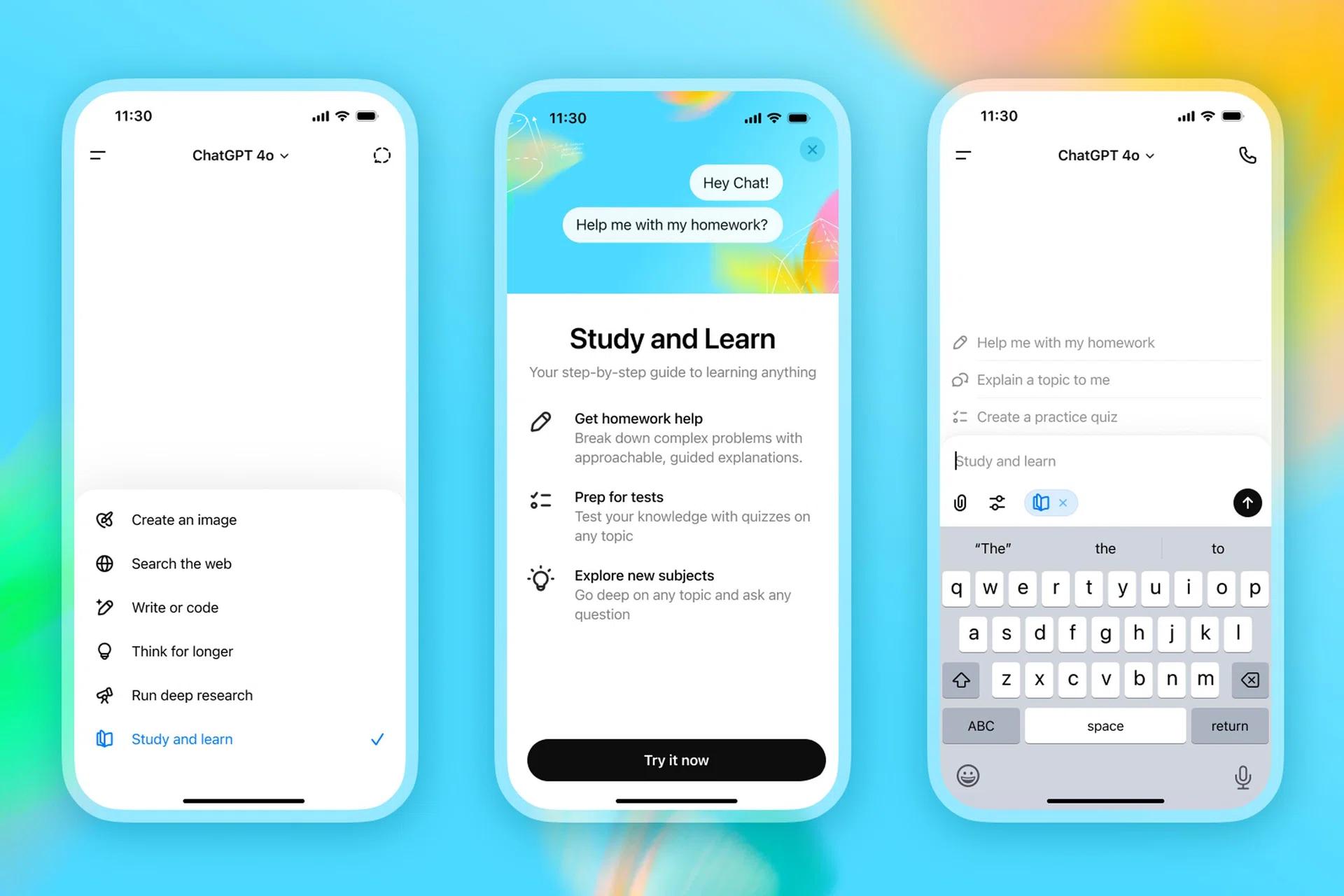
ChatGPT is one of the AI tools with many applications in education and at work.
According to a report published by OpenAI in August 2026, users worldwide have up to around 70 million conversations with ChatGPT each week about checking their knowledge, identifying misunderstandings, and requesting additional practice exercises.
This figure shows that there is considerable demand for using AI in learning activities, but it does not mean that all users achieve better learning outcomes with AI.
2.1. How does ChatGPT support students?
Students can use ChatGPT to:
Explain concepts in simple language.
Practice different types of problems.
Check what you have learned.
Practice English.
Help create a study plan.
For example, when they do not understand how to calculate percentages, students can ask:
"Please explain how to calculate percentages using a real-life example, then give me three practice problems and only provide the answers after I have finished."
Asking the question this way helps learners take an active role in solving the problem.
2.2. Study Mode – Learning mode in ChatGPT
Study Mode is designed to guide users through learning with questions and step-by-step prompts.
Rather than always giving the solution immediately, AI can:
Ask learners what they already know.
Break the problem down.
Give a hint.
Create quiz questions.
Explain why a learner answered incorrectly.
For example, when practicing a math problem, students can ask ChatGPT for step-by-step guidance and have it continue only after they have answered the current question.
This feature is suitable for people who want to learn how to solve problems rather than simply complete assignments.
Study Mode is available on supported ChatGPT plans, but is still subject to the applicable usage limits.
2.3. How ChatGPT supports student research
Students can use ChatGPT to:
Develop an essay outline.
Explain specialized terminology.
Organize knowledge systematically.
Suggest research questions.
Data analysis and presentation.
Practice presentations and critical thinking.
For example:
"Act as a lecturer and ask five challenging questions about my research topic. After each answer, assess its strengths and areas for improvement."
However, ChatGPT can generate inaccurate information or references. Students should verify sources and avoid using unverified citations in research papers.
2.4. How ChatGPT supports teachers
Teachers can use AI to develop classroom activity ideas, design questions at different levels of cognitive complexity, or suggest assessment formats.
In August 2026, OpenAI continued expanding ChatGPT for Teachers in the U.S., adding access and training for more than 100,000 teachers and school staff.
However, ChatGPT for Teachers is currently available to eligible K–12 educators in the U.S.; it is not a default free plan for all teachers in Vietnam.
Google Gemini – A focus on personalized learning
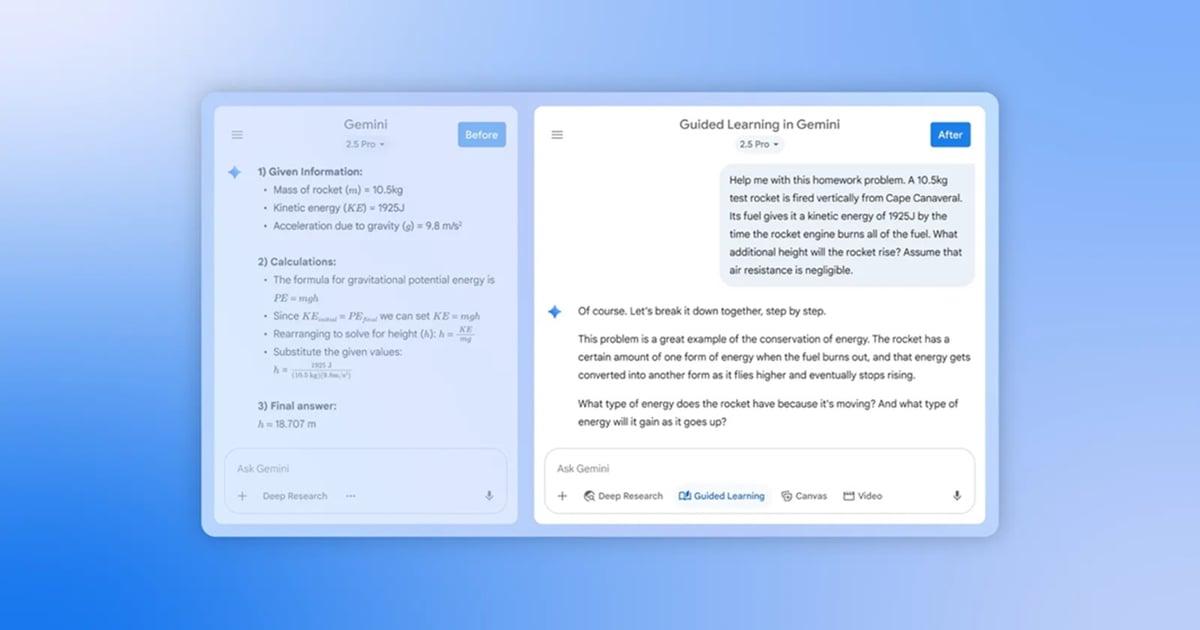
Google Gemini is an AI system that can help explain concepts, process documents, and support many learning tasks.
In 2026, Google introduced specialized learning features such as Study Notebooks and expanded Guided Learning.
3.1. Guided Learning – Learn by asking questions
Guided Learning is designed to guide learners through solving problems step by step.
Rather than simply displaying the answers, AI can use guiding questions to help students understand the underlying concepts.
For example, for a physics problem, AI might ask:
"In your opinion, which quantities are known and which one needs to be found?"
Then, AI continues by guiding the learner in choosing the appropriate formula.
This method may help students participate more actively in the problem-solving process.
3.2. Study Notebooks – Personalized study notebooks
In June 2026, Google introduced Study Notebooks in Gemini.
This feature allows learners to use their learning goals and personal materials to build a study plan.
The process may include:
Identify learning objectives.
Download related materials.
Take a diagnostic test.
Get short lessons.
Practice and track progress.
Learning content is adjusted based on practice results and supplementary materials.
This is a specific example of the trend toward AI-powered personalized learning.
3.3. Google Classroom integrates Guided Learning
On November 3, 2026, Google announced the global rollout of Guided Learning for learning activities assigned by teachers in Google Classroom.
This tool lets teachers create guided activities based on their class materials.
Students can get step-by-step support with solving problems, while teachers gain more information about learning progress.
Google also announced that schools would have greater control over AI features for K–12 student accounts.
Therefore, which features students can use also depends on the school’s policies and settings.
NotebookLM and Gemini Notebook – Learning from existing materials
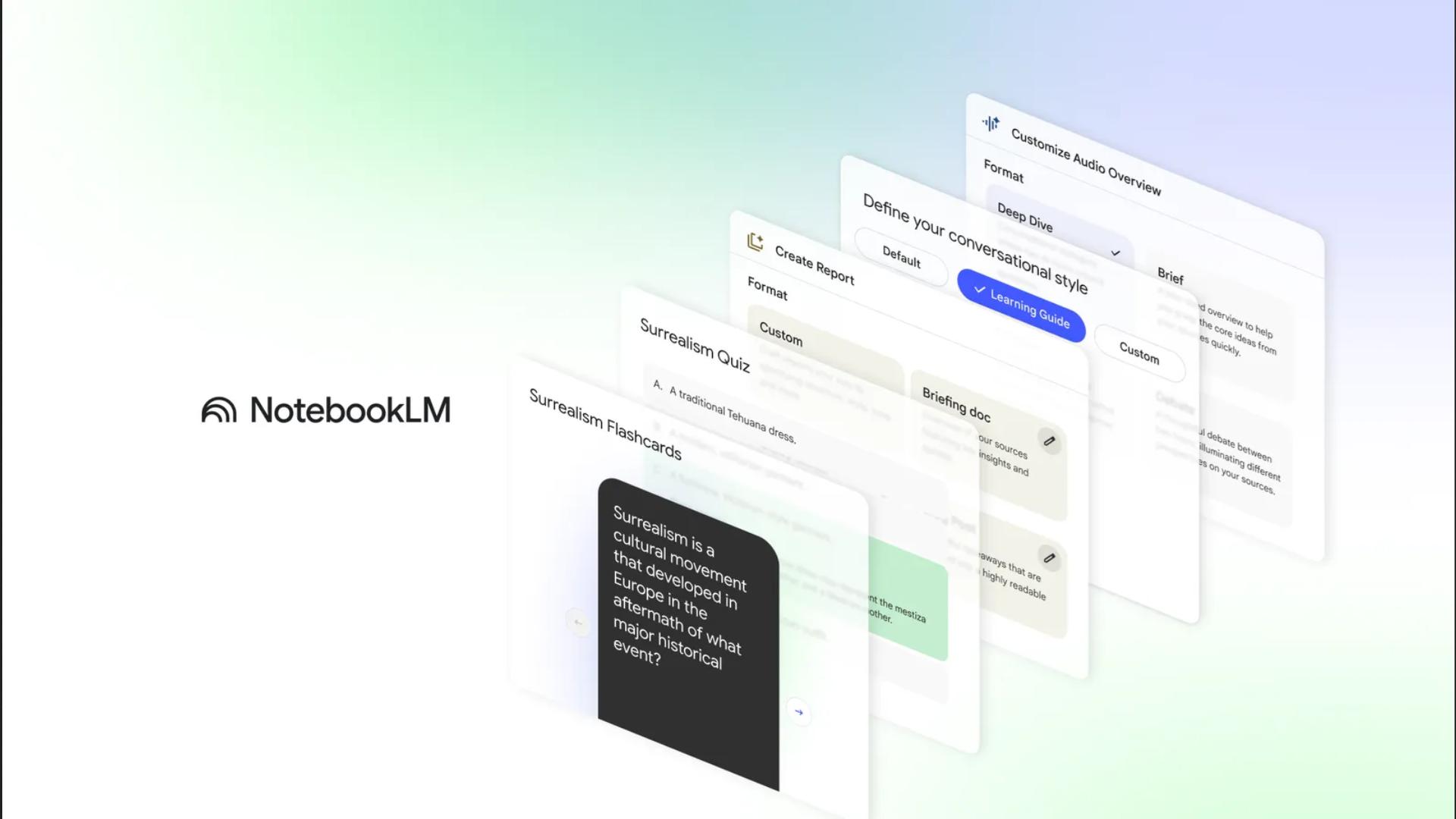
NotebookLM, with experiences Google is expanding under the name Gemini Notebook, is a noteworthy set of tools for students who frequently work with documents.
Unlike simply asking AI questions, learners can provide specific source materials for the tool to use as a basis for helping them review.
4.1. Summarizing learning materials
Learners can add lecture materials, notes, and supported sources.
AI can help identify key content, create summaries, and answer questions based on sources.
This is useful when reviewing a long chapter or preparing for an exam.
4.2. Creating flashcards and review questions
NotebookLM supports creating flashcards and quizzes from documents.
For example, when studying biology, students can upload materials about the respiratory system and ask AI to create a set of questions for self-assessment.
This is a suitable format for practicing recall and identifying material that has not yet been mastered.
4.3. Videos and interactive lessons
In October 2026, Google announced new Gemini Notebook features, including:
Short Video Overviews: short summary videos of approximately 60 seconds.
Interactive Learning Overviews: Summarize knowledge in an interactive sequence.
Expand question formats: Multiple-choice, fill-in-the-blank, and short-answer questions.
Features that help learners engage with content in different ways.
However, check availability based on your account, language, and rollout timing.
4.4. Can NotebookLM replace reading the materials?
No.
AI-generated summaries and answers may omit important details.
Learners still need to read the original sources, check citations, and assess their own understanding of the material.
Canva Education – Designing learning materials with AI
Canva is a design platform used to create slides, posters, infographics, and many other types of visual content.
With Canva Education, eligible teachers and students can use design tools for educational activities.
5.1. Creating lessons and visual learning materials
Teachers can use Canva to create:
Lecture slides.
Worksheet.
Infographic.
Poster.
Knowledge map.
Group activity materials.
Supported AI tools can help suggest content, layouts, and illustrations.
5.2. Canva Code and Magic ActiveX
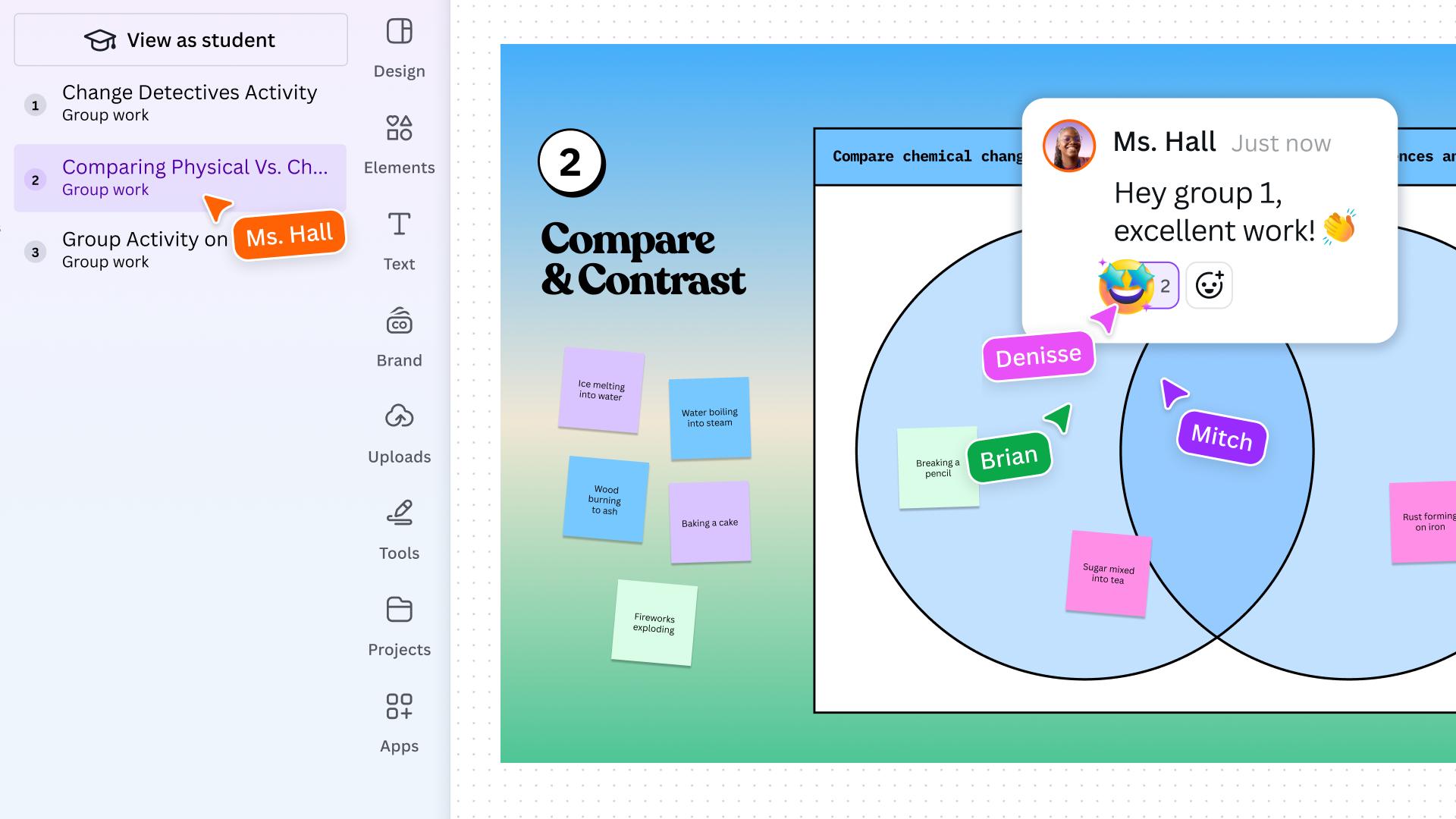
In 2026, Canva continued to expand features such as Canva Code 2.0 and Magic Activities for educational activities.
Teachers can try creating games, interactive activities, and learning content from prompts.
For example:
"Create a 10-question multiple-choice quiz about the environment for seventh-grade students. Each question should have four options and provide feedback after the student answers."
After AI generates content, teachers need to check its accuracy and suitability for the curriculum.
5.3. Digital literacy and AI literacy education
In October 2026, Canva announced a partnership with Common Sense Media to bring 60 resources on digital citizenship, AI literacy, and online safety to Canva Education.
This is a noteworthy development because AI in education is not only about learning how to use tools, but also about understanding the limitations, risks, and responsibilities involved in using technology.
Quizlet – A tool for flashcards and knowledge practice
Quizlet is a learning platform that supports studying through flashcards and review activities.
This tool is suited to learners who need to memorize many terms, concepts, or vocabulary words.
6.1. Learning vocabulary with flashcards
Learners can build an English vocabulary list and use flashcards to review it.
For example, a student studying business English can create a set of cards with terms, definitions, and usage examples.
6.2. Test Your Knowledge
Quizlet’s study and testing modes help learners assess how well they remember the material.
Some AI features and advanced activities may depend on the account plan.
6.3. Who Is Quizlet Suitable For?
Quizlet is suitable for:
Students practice vocabulary.
Students learning specialized terminology.
People preparing for a test.
Language learners.
People who need to review material using a set of flashcards.
Quizlet is most effective when combined with explaining concepts in your own words, applying knowledge, and practicing regularly.
QuillBot – Support for Academic Writing and Editing
QuillBot is a text-processing tool suited to writing, sentence editing, and improving expression.
7.1. Rephrasing Sentences
Users can use QuillBot to explore different ways of expressing ideas.
For example, when the meaning of an English passage is unclear, a tool can suggest ways to make the wording more coherent.
7.2. Grammar Checking Support
QuillBot offers tools to help check wording and grammar.
For university students, this feature may be useful when writing emails, essays, or documents in English.
7.3. What Should You Keep in Mind?
QuillBot does not guarantee that rewritten text is accurate or appropriate for academic standards.
In particular, rewriting text with AI does not remove the obligation to cite sources.
Students must comply with their institution’s policies on plagiarism and AI use.
Summary Table of 7 AI Tools for Education in 2026
Here is a quick summary table of platforms and tool categories worth considering.
Tool | Strengths | Suitable for |
|---|---|---|
ChatGPT | Explanation, practice, feedback | Students, university students, teachers |
Gemini | Step-by-step, personalized learning guidance | Students, university students |
NotebookLM/Gemini Notebook | Learn from materials, flashcards, quizzes | Students, researchers |
Canva Education | Design learning materials, slides, and interactive activities | Teachers, students |
Quizlet | Flashcards, memorization, and review | Students, university students |
QuillBot | Rewrite, edit, and provide language support | Students, foreign-language learners |
Google Classroom with Guided Learning | Assign AI learning activities and track progress | Teachers, schools |
The table above summarizes notable capabilities; it is not a ranking of quality or popularity in Vietnam.
Access to the tools also depends on age, subscription plan, school account, and deployment policies.
Five Notable AI Trends in Education in 2026
9.1. Personalizing Learning to Match Ability
AI can adapt activities based on learners’ goals, materials, and practice results.
For example, a student who is struggling with statistics can get additional practice questions focused on this subject.
9.2. AI as a Guide Instead of Just Providing Answers
Study Mode and Guided Learning reflect a trend toward developing AI that supports learners’ thinking.
Instead of doing the assignment for the student, AI can ask questions and offer hints.
9.3. Multimodal Learning
Learners can access knowledge through text, images, audio, video, and interactive activities.
For example, a topic can be studied using documents, Flashcards, and a summary video.
9.4. More Support Tools for Teachers
AI can help teachers spend less time preparing materials and designing learning activities.
However, teachers still need to review the content, choose the approach, and assess learning in practice.
9.5. Teaching Responsible AI Use
Schools increasingly need to address AI literacy, data protection, identifying misinformation, and academic integrity.
This is an important capability alongside tool-use skills.
Which AI tools should school and university students choose?
Your choice should be based on your learning goals rather than the number of features.
K–12 students
Prioritize tools that support explanations and step-by-step guidance, with appropriate supervision from parents or schools.
For accounts used by people who do not meet the minimum age requirement, the platform's terms of use must be followed.
Undergraduate students
You can combine:
ChatGPT for discussion and critical-thinking practice.
Gemini for exploring and explaining concepts.
NotebookLM for working with documents.
Quizlet for memorization.
Use Canva to create a presentation.
QuillBot for reference on phrasing.
You don't necessarily need to pay for every tool.
Teachers
Prioritize tools that suit the lesson objectives, technological conditions, and students’ age.
For example, Canva helps prepare learning materials, ChatGPT can suggest activities, and Google Classroom helps manage activities integrated into the platform.
A guide to using AI effectively for learning
One important principle is to use AI to support independent learning, rather than handing over the entire thinking process to the tool.
Step 1: Define Your Learning Goal
Before opening an AI tool, identify whether you need to understand a subject, prepare for an exam, practice a foreign language, or work with documents.
Step 2: Provide Reliable Materials
Prioritize textbooks, lectures, or authoritative materials.
Step 3: Ask AI to Guide You Step by Step
For example:
"I’m a 9th-grade student. Help me understand this problem by asking me questions step by step. Don’t give me the answer right away."
Step 4: Do the Work Yourself
After receiving guidance, learners need to answer for themselves and explain their approach.
Step 5: Check the Results
Compare it with the materials and the teacher's feedback.
Step 6: Note What You Haven’t Mastered
Use review questions or Flashcards to practice the areas you find most challenging.
Risks of using AI in education
12.1. Becoming dependent on AI
If learners only copy answers, they may complete assignments without understanding the material.
12.2. Inaccurate content
AI may provide incorrect solutions, cite nonexistent sources, or offer approaches that are unsuitable for the curriculum.
12.3. Cheating and plagiarism
Using AI to create an entire assignment and then presenting it as work you completed yourself may violate academic rules.
12.4. Personal data risks
You should not casually enter student information, grades, personal records, or classroom data into public AI tools.
12.5. Unequal access to technology
Not every learner has a device, Internet access, or the means to subscribe to paid services.
Schools need to consider fairness when designing activities that use AI.
According to UNESCO's guidance, AI in education should be implemented in a human-centered way that protects privacy and is appropriate for learners' ages.
Should you buy paid AI plans for learning?
Not every learning need requires a paid AI account.
Free versions of ChatGPT, Gemini, or other learning tools may be sufficient for many basic tasks.
However, users who work with documents regularly, need higher usage limits, or use advanced features may consider a paid plan.
When should you use the free version?
Basic learning needs.
Do not use AI regularly.
You only need a brief explanation of a concept or a short practice session.
Want to try out the tool before subscribing.
When should you consider a paid plan?
Analyze materials regularly.
You need higher AI usage limits.
Use features that are not included in the free version.
You have in-depth learning or work needs.
Before signing up, check the provider's policies, account management rights, and terms of use.
Explore AI learning tools at ShareTaiKhoan
If you’re exploring AI tools for learning, research, or presentation design, you can browse the service options introduced at ShareTaiKhoan.com.vn.
Some product categories worth considering include:
Canva.
QuillBot Premium.
Quizlet Plus.
Other AI tools available on the website.
Before choosing, users should check:
Plan features.
Subscription duration.
AI limits.
Account management rights.
Support policy.
The provider's terms of use.
For underage students, parents and schools should check the age requirements and access rules.
Explore AI tools that support learning at ShareTaiKhoan.com.vn to choose a service that suits your needs.
ShareTaiKhoan is an independent service provider and is not an official representative of OpenAI, Google, Canva, Quizlet, or QuillBot.
Frequently asked questions about AI in education in 2026
What Is AI in Education?
AI in education is the application of artificial intelligence to support teaching, research, educational management, and the assessment of learning activities.
Which AI tool is best suited to university students?
It depends on your needs. ChatGPT and Gemini are suitable for explaining concepts; NotebookLM is useful for learning from documents; Quizlet is suitable for studying with Flashcards.
Does ChatGPT have a study mode?
Yes. Study Mode supports learning through guided questions and step-by-step guidance.
Does Gemini support exam preparation?
Yes. Gemini offers features such as Guided Learning and Study Notebooks, with access depending on the account.
Can NotebookLM create multiple-choice questions?
Yes. NotebookLM can generate review questions and flashcards from the source materials provided.
Can teachers use AI to prepare lesson plans?
AI can be used to help develop a draft and activity ideas. Teachers still need to check the content and ensure it is appropriate for the curriculum.
Can AI Replace Teachers?
No. AI can support explanation and practice, but it cannot replace teachers’ professional expertise, educational role, or direct interaction with students.
Is using AI to do homework considered cheating?
This depends on the school's rules and the assignment requirements. Using AI in violation of the rules or submitting AI-generated content as your own work may be considered academic misconduct.
Should students use free AI?
Yes, if the tool is appropriate for the students’ age, complies with school policies, and is used with guidance on safe use.
Do you need to buy multiple AI accounts to study more effectively?
Not necessarily. Some free tools may meet most basic needs. What matters is the learning method and the ability to use AI for the right purpose.
Conclusion: How is AI changing education in 2026?
2026 shows that AI in education is shifting from answering questions to more personalized and interactive learning experiences.
ChatGPT with Study Mode, Gemini with Guided Learning, NotebookLM with study tools, and Canva Education with learning-material creation capabilities are notable examples of this trend.
For students, AI can help explain concepts and support independent learning.
For university students, AI expands their ability to conduct research, review material, and process documents.
For teachers, AI can reduce some preparation tasks and help create a wider variety of learning activities.
However, AI is truly valuable only when it is used to develop people's thinking, initiative, and ability to learn.
Are you looking for AI tools for study and work?
Access ShareTaiKhoan.com.vn to explore AI service options and find out which usage benefits are right for you.
(0 ratings - 0/5)
Buy affordable accounts at ShareTaiKhoan
Compare packages
| Product | Package | Type | Price | |
|---|---|---|---|---|
| ChatGPT Plus | Plus - 1 month | Shared | 149.000₫ | Buy |
| ChatGPT Plus | Plus - 3 months | Shared | 399.000₫ | Buy |
| ChatGPT Plus | Plus - 1 year | Shared | 1.499.000₫ | Buy |
| ChatGPT Plus | Plus - Lifetime | Shared | 4.500.000₫ | Buy |
| Gemini Pro | Pro - 1 month | Shared | 149.000₫ | Buy |
| Gemini Pro | Pro - 3 months | Shared | 399.000₫ | Buy |
| Gemini Pro | Pro - 1 year | Shared | 1.299.000₫ | Buy |
| Gemini Pro | Pro - Lifetime | Shared | 2.899.000₫ | Buy |
| Quizlet | Plus - 1 month | Shared | 99.000₫ | Buy |
| Quizlet | Plus - 3 months | Shared | 199.000₫ | Buy |
| Quizlet | Plus - 1 year | Shared | 399.000₫ | Buy |
| Quizlet | Plus - Lifetime | Shared | 899.000₫ | Buy |
Related products
Other articles
- What Is New in Suno v6? Models, Studio 2.0 and Plans for 2026
- When Is Black Friday 2026? Sale Schedule & Shopping Tips
- Is Gemma 5 Coming Soon? Google Makes AI 2.85 Times Faster
- Is Meta Muse Free? Plans and Terms of Use
- What is Udemy Business? A corporate training platform
- What is QuillBot? A guide to using QuillBot from A–Z
- What Is TurboScribe? How to Convert Audio, Video to Text
Comments (0)
Sign in or register to comment.
No comments yet.