
What is QuillBot? A guide to using QuillBot from A–Z

Published:

QuillBot is an AI tool that helps you rewrite text, check grammar, summarize documents, and improve your wording. But is QuillBot free, how well does it support Vietnamese, and how do you use it? In this article, ShareTaiKhoan.com.vn will guide you through using QuillBot from A–Z with easy-to-follow examples, compare Free and Premium, and introduce QuillBot pricing starting at 99.000đ so you can choose an option that suits your studies and work.
QuillBot is an AI tool that helps you rewrite text, check grammar, summarize documents, and improve your wording. But is QuillBot free, how well does it support Vietnamese, and how do you use it?
In this article, ShareTaiKhoan.com.vn will guide you through using QuillBot from A–Z with easy-to-follow examples, compare Free and Premium, and introduce QuillBot pricing starting at 99.000đ to help you choose the right option for your studies and work.
What is QuillBot? What is it used for?
QuillBot is a platform that supports writing and editing text using artificial intelligence (AI)., stands out for its Paraphraser feature, which helps rephrase sentences or paragraphs in different ways.
Instead of having to find synonyms and rewrite each sentence yourself, you can enter text into QuillBot to get alternative ways of expressing it.
In addition to Paraphraser, QuillBot also includes tools for grammar checking, document summarization, translation, citation creation, and AI content analysis.
QuillBot is particularly well suited to English learners, students, teachers, researchers, and office workers.
You can start using it for free at QuillBot.com.
QuillBot’s standout features
Tool | Main features |
|---|---|
Paraphraser | Rewrite sentences and paragraphs and improve the wording |
Grammar Checker | Detect grammar and spelling errors |
Summarizer | Summarize long texts into concise content |
Translator | Translate text between multiple languages |
Citation Generator | Create citations in APA, MLA, and Chicago styles |
Plagiarism Checker | Check for similarity to other sources |
AI Detector | Analyze signs of AI-generated content |
AI Humanizer | Helps make your wording sound more natural |
QuillBot Flow | Supports research, writing, and editing in one workspace |
Including: Paraphraser, Grammar Checker, and Summarizer are the three tools that beginners should learn about first.
What is the difference between QuillBot Free and Premium?
QuillBot offers a free version so users can try it before subscribing to Premium.
The main differences are word limits, rewriting modes, advanced tools, and the ability to process long documents.
Criteria | QuillBot Free | QuillBot Premium |
|---|---|---|
Cost | Free | Paid |
Rewrite the text | Up to approximately 125 words per request on the current Premium page | Unlimited word count under the Paraphraser benefit |
Rewrite mode | Standard, Fluency | 9 available modes and customization |
Grammar Checker | Fix basic errors | Advanced suggestions |
Summarizer | Up to 1,200 words | Up to 6,000 words |
AI Humanizer | Limits | Expand usage rights |
AI Detector | Limits | Extended usage rights |
Plagiarism Checker | Limitations | 25.000 words/month according to the pricing table |
Suitable | Beginners with basic needs | People who regularly write and process documents |
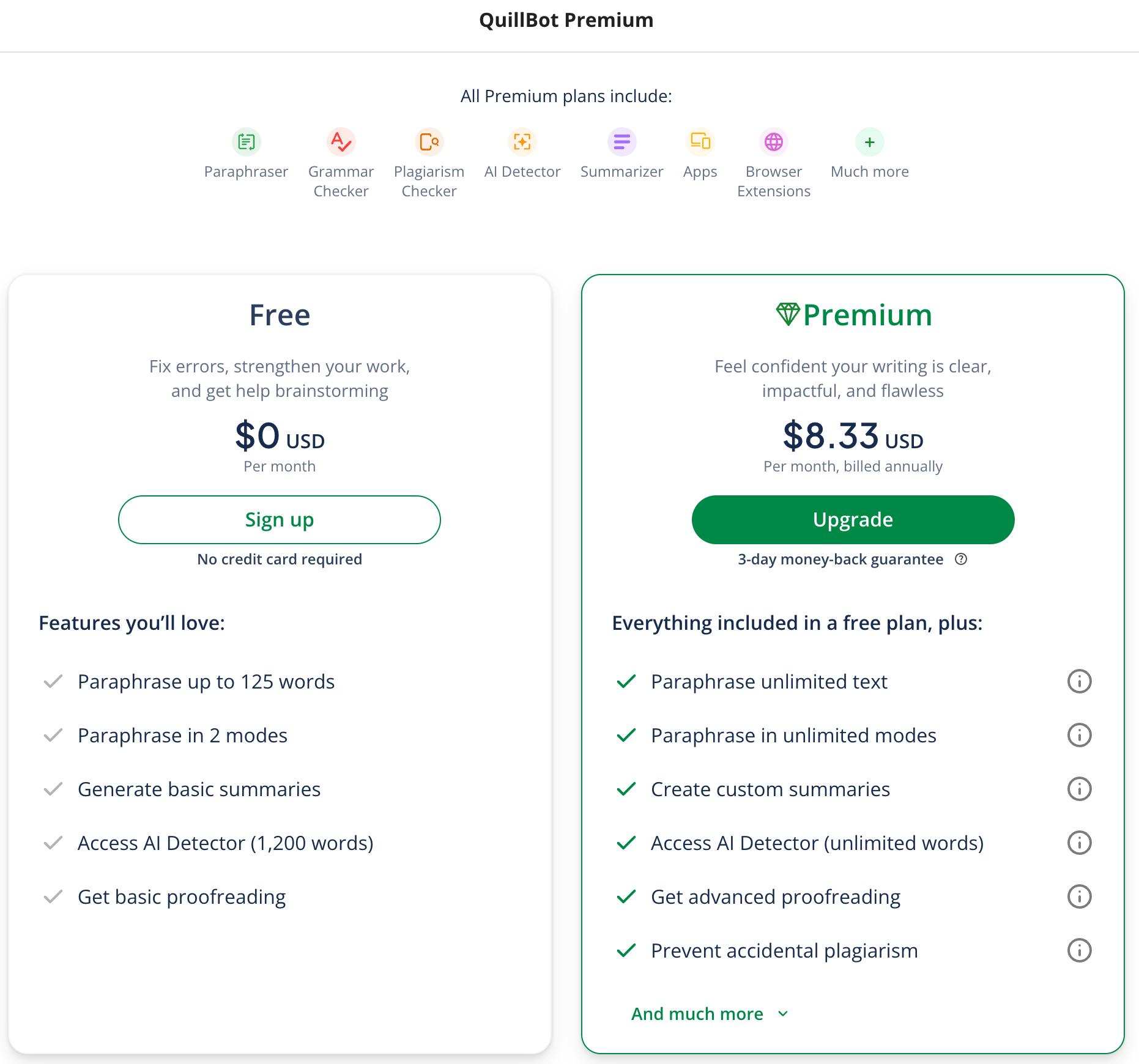
Limits may vary across platforms, versions, and accounts.
Which plan should you choose?
If you only occasionally rewrite a short passage or check a few English sentences, QuillBot Free may be enough.
Conversely, if you regularly work with long documents, need a wider range of writing styles, or require advanced checking tools, Premium is worth considering.
QuillBot Premium pricing at ShareTaiKhoan 2026
If you are looking for low-cost QuillBot Premium account, ShareTaiKhoan currently lists options with different subscription durations and delivery methods.
Pricing updated on 15/11/2026
QuillBot Premium plan | Format | Price |
|---|---|---|
Premium – 1 month | Shared | 99,000 VND |
Premium – 3 months | Shared | 199,000 VND |
Premium – 1 year | Shared | 399.000đ |
Premium – Lifetime | Long-term shared service | 899.000đ |
Premium – 1 year | Personal account upgrade as described by the store | 899.000đ |
This is the service price published by ShareTaiKhoan, not QuillBot developer’s official pricing. Prices and plan availability may change.
View QuillBot Premium pricing at ShareTaiKhoan
Account types to keep in mind
Shared plan: According to the store’s description, the account is provided to multiple people, is limited to one device, and customers must not change the password if they wish to maintain the warranty conditions.
Personal account upgrade plan: The product page describes a one-year upgrade to the customer’s account. However, the store requires an email address and password to carry this out. You should not share the password for your primary account or a password reused on another service; prioritize a direct upgrade or a method permitted by the developer.
Lifetime plan: This is a separate long-term service program offered by ShareTaiKhoan, is not an official QuillBot Lifetime plan. The store states a warranty commitment for at least 20 years of use under the contract terms, subject to the ability to maintain the service lawfully and the agreed terms. Lifetime does not mean permanent access guaranteed by QuillBot.
In particular, QuillBot stipulates that an individual Premium account is for one person only and does not allow account or password sharing.. Accounts that violate the rules may be disabled. If multiple members need to use the service legitimately, you should consider the official Team Plan.
Therefore, in addition to the price, carefully check access rights, management rights, and terms of service before paying.
A–Z guide to using QuillBot for beginners
You don’t need programming knowledge or advanced AI skills to get started with QuillBot; just follow a few simple steps.
Step 1: Sign up for a free account
Access QuillBot.com, choose to sign up or log in using a supported method.
Once you reach the main interface, you can choose tools such as Paraphraser, Grammar Checker, or Summarizer.
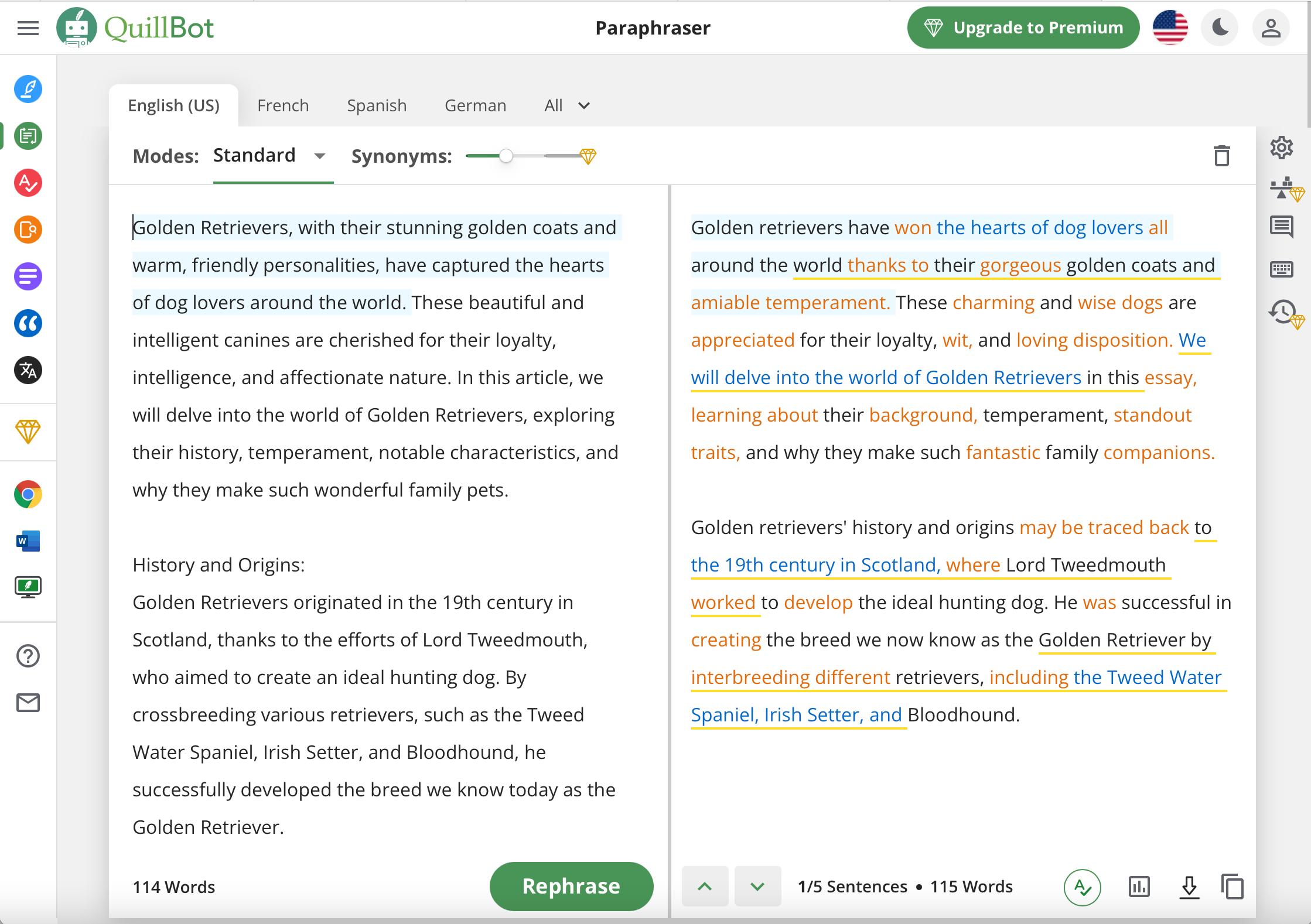
Step 2: Use Paraphraser to rewrite text
Open QuillBot Paraphraser.
Enter an English sentence, for example:
Original sentence:
Learning English every day helps students improve their communication skills.
One suggested rewrite:
Practicing English daily can help students develop stronger communication skills.
Then:
Paste the content into the input box.
Choose Standard or Fluency.
Click Paraphrase.
Read the results and compare them with the original.
Edit or copy once you are satisfied.
The two most popular modes are:
Standard: Balance changing the wording with preserving the original meaning.
Fluency: Focus on making sentences more natural, fluent, and grammatically correct.
With Premium, you can also choose styles such as Formal, Academic, Simple, Creative, Expand, or Shorten, depending on your plan benefits.
Tip: When paraphrasing academic content, prioritize preserving the meaning rather than trying to change as many words as possible.
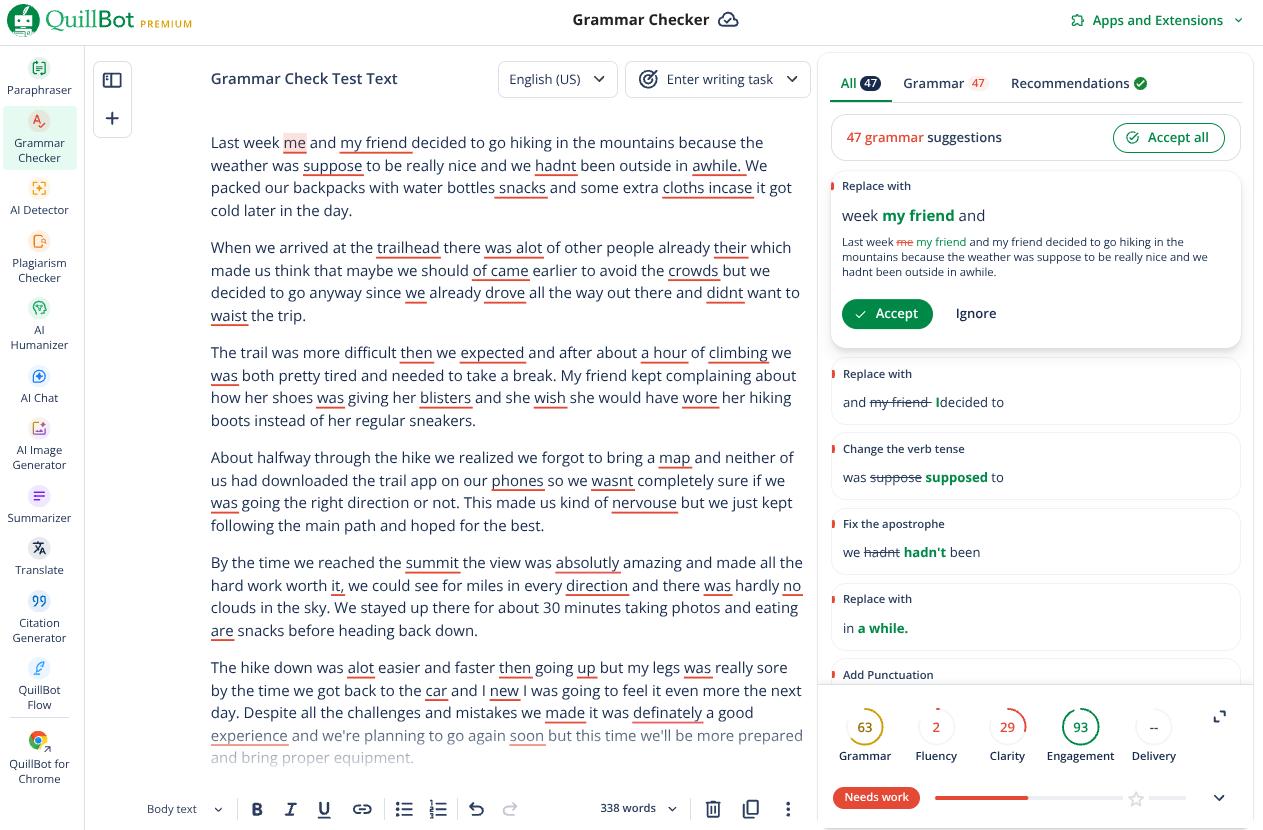
Step 3: Correct grammar with Grammar Checker
Access Grammar Checker.
For example:
Incorrect sentence: She don't have enough informations.
Correct sentence: She doesn't have enough information.
How to use it:
Enter or paste text.
View the errors detected by QuillBot.
Review the suggested corrections.
Apply the appropriate changes.
Grammar Checker is useful for writing emails, reports, and essays, or preparing English-language presentations.
However, you should still proofread the result to avoid cases where the tool changes specialized terminology incorrectly or alters the intended meaning.
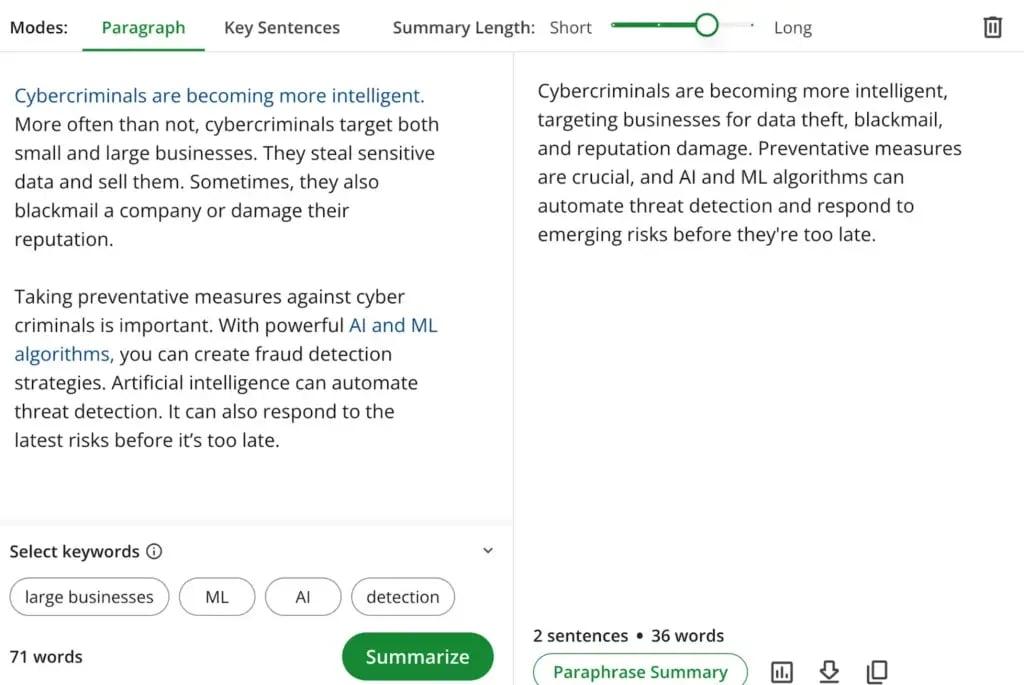
Step 4: Summarize documents with Summarizer
Open QuillBot Summarizer.
After entering the text, you can choose a supported summary format, such as a short paragraph or key points.
The process includes:
Copy the content you need to summarize.
Paste it into Summarizer.
Choose the summary style and length, if available.
Generate results.
Compare it with the source material.
This feature is useful for quickly reading articles, reference materials, or preparing study notes.
Note: Do not use a summary in place of the original material when you need to verify important figures, conclusions, or citations.
Step 5: Translate and generate citations
In addition to its three main tools, QuillBot also offers:
Translator: Helps translate text between multiple languages. This is useful when learning a foreign language or referring to content from abroad.
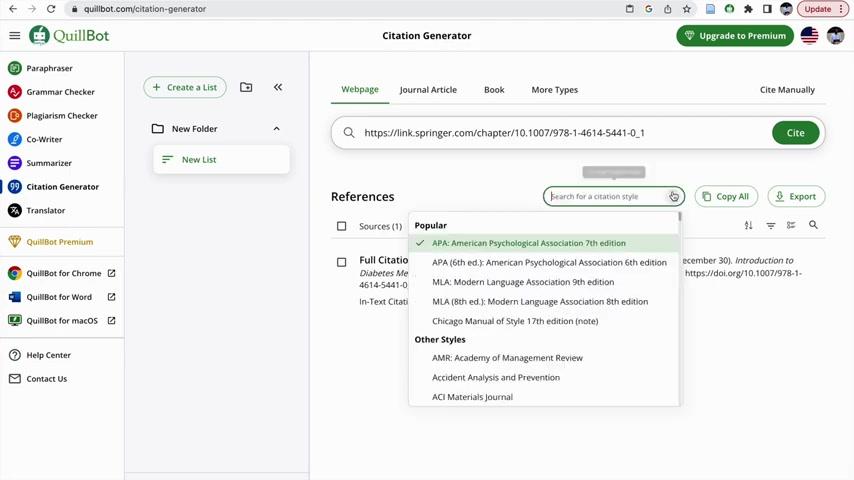
Citation Generator: Helps create citations in APA, MLA, or Chicago style.
To create a citation, visit Citation Generator, enter the document details and choose an appropriate style.
Once you have the result, check the author’s name, publication year, title, and link.
Does QuillBot support Vietnamese?
Yes, QuillBot supports multiple languages, and different tools and versions may offer varying levels of Vietnamese support.
You can use QuillBot to explore different ways of phrasing or translate content, but don’t assume that every feature handles Vietnamese as well as English.
For example:
With Translator, you can check whether translation into Vietnamese is supported.
With Paraphraser, check the supported languages in the current interface.
With Grammar Checker, you need to check the list of supported languages before using it to correct Vietnamese errors.
If your goal is to write essays or improve your English skills, QuillBot is a tool worth trying.
Who should use QuillBot? Is Premium worth upgrading to?
QuillBot serves a range of needs, but not everyone needs to subscribe to Premium.
Audience | Common needs | Suggestions |
|---|---|---|
English language learners | Rewrite the sentence and correct the grammar | Start with Free |
Students | Essays, summaries, citations | Free or Premium, depending on usage volume |
Teachers | Editing English documents | Consider Premium if you use it frequently |
Content Writer | Edit the wording | Free or Premium |
Office workers | Emails and reports in English | Free for basic needs |
Researchers | Summarize and review long documents | Consider Premium |
When should you upgrade?
You should consider Premium if you frequently:
Rewrite a paragraph that exceeds the Free limit.
Need more writing styles.
Summarize long documents.
Check for plagiarism and edit text in depth.
Use QuillBot as a tool to support your daily work.
Conversely, if you only use it a few times a week to check sentences or summarize short passages, the free version may be enough.
Principle: Upgrade only when paid features address your actual needs.
Important things to keep in mind when using QuillBot
QuillBot can help improve your writing, but how effective it is depends on how you use it.
Preserve the original meaning: After rewriting, review the result to avoid any changes in meaning.
Source citation: Changing the wording does not remove the obligation to cite sources when using other people’s ideas or data.
Don’t rely entirely on AI: Suggestions about grammar, summaries, or citations still need to be checked.
Data protection: Do not enter passwords, customer information, or confidential documents into online tools without an appropriate basis for trusting their security.
Don’t treat the AI Detector as definitive: AI content detection results should be treated as reference information only.
If you use QuillBot for your studies, you should also comply with your instructor’s or school’s rules on AI tools.
How to buy QuillBot Premium at ShareTaiKhoan
If you want to review the Premium plans listed on the website, you can follow this process.
Step 1: Access QuillBot Premium product page at ShareTaiKhoan.
Step 2: Choose the appropriate account delivery and subscription duration.
Step 3: Check the price, access, device limits, and warranty terms.
Step 4: Select Buy Now or add it to your cart.
Step 5: Complete your payment by following the website’s instructions.
Step 6: Receive the handover information and check your access.
According to ShareTaiKhoan’s published policy, for issues within the scope of its service-delivery responsibilities, the store may help resolve the issue, provide an equivalent replacement, or refund the unused portion of the subscription duration, subject to the applicable conditions.
Cases involving violations of the developer’s terms or terms of use are reviewed individually.
You should carefully review the details of each option before paying, especially for shared and Lifetime plans.
Frequently asked questions about QuillBot
Is QuillBot free?
Yes. QuillBot Free offers basic features such as Paraphraser, Grammar Checker, and Summarizer, subject to usage limits.
Can QuillBot rewrite English text?
Yes. Paraphraser is one of QuillBot’s standout features, helping generate different ways to express the same idea.
How much does QuillBot Premium cost?
According to ShareTaiKhoan’s price list dated 15/11/2026, the one-month Shared Premium plan is listed at 99.000đ, the three-month plan at 199.000đ, and the one-year plan at 399.000đ. These are third-party service prices, not the developer’s prices.
Does QuillBot help avoid plagiarism?
QuillBot supports rewriting and plagiarism checks, but does not guarantee that content complies with academic rules. You still need to cite sources when using other people’s ideas or information.
Can QuillBot be used on a phone?
Yes. QuillBot offers ways to use it on mobile devices. Access and features may vary across platforms.
Can the QuillBot Lifetime plan be used forever?
Not quite. Lifetime on ShareTaiKhoan is the name of the store’s own long-term service program, with published maintenance conditions and warranty commitments. It is not a permanent-access plan guaranteed by QuillBot.
Conclusion – Is QuillBot worth using?
QuillBot is a useful AI tool for people who want to improve their writing, correct grammar, summarize documents, and work with English content more effectively.
If you are just getting started, try QuillBot Free to familiarize yourself with its features.
If you regularly work with long texts, need more rewriting modes, or use advanced tools, Premium may be worth considering.
At ShareTaiKhoan, published QuillBot Premium options start from 99.000đ/month. However, you should check the validity of access, terms of use, and support policy before deciding.
Explore QuillBot Premium at ShareTaiKhoan
See the plans, subscription durations, and service terms directly at:
VIEW QUILLBOT PREMIUM PRICING AT SHARETAIKHOAN.COM.VN
ShareTaiKhoan.com.vn – Your digital account hub.
Zalo/WhatsApp: 0337 018 337
Email: cskh@sharetaikhoan.com.vn
ShareTaiKhoan is an independent service provider, not the developer of QuillBot. Users should review the developer’s terms before using third-party services.
References
Updated: 15/11/2026. Prices, features, and usage limits may change according to each provider’s policies.
(1 ratings - 5/5)
Buy affordable accounts at ShareTaiKhoan

Related products


Other articles
- What Is New in Suno v6? Models, Studio 2.0 and Plans for 2026
- When Is Black Friday 2026? Sale Schedule & Shopping Tips
- Is Gemma 5 Coming Soon? Google Makes AI 2.85 Times Faster
- Is Meta Muse Free? Plans and Terms of Use
- What is Udemy Business? A corporate training platform
- What Is TurboScribe? How to Convert Audio, Video to Text
- What Is Otter AI? A Guide to Recording Audio, Converting Speech to Text
Comments (0)
Sign in or register to comment.
No comments yet.