
What Is New in Suno v6? Models, Studio 2.0 and Plans for 2026
Published:
Suno is one of the fastest-changing AI products. A guide written at the beginning of 2026 could already be wrong by the end of the year about model names, the interface and even music download rights. This article summarizes the state of the service as of 11/2026 so you know what you are paying for. Given that pace of change, treat the figures below as reference points and double-check them on the official website.
What is new in Suno v6? Three models, Studio 2.0, download limits and what each plan includes
Suno is one of the fastest-changing AI products. A guide written at the beginning of 2026 could already be wrong by the end of the year about model names, the interface and even music download rights. This article summarizes the state of the service as of 11/2026 so you know what you are paying for. Given that pace of change, treat the figures below as reference points and double-check them on the official website.
If you have never used it, read the article What is Suno AI.
The v6 model family
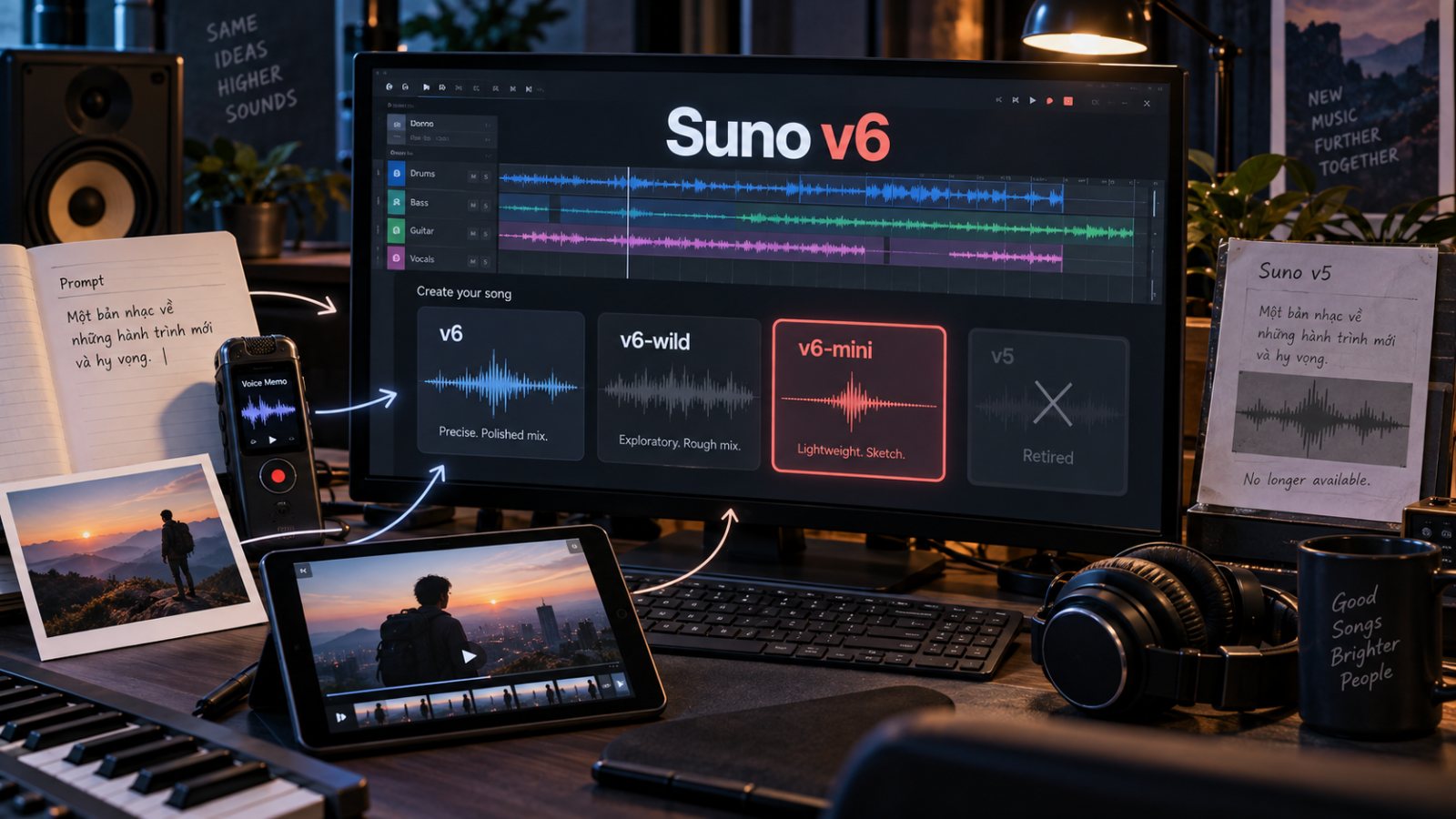
In September 2026, Suno launched the v6 generation with three variants:
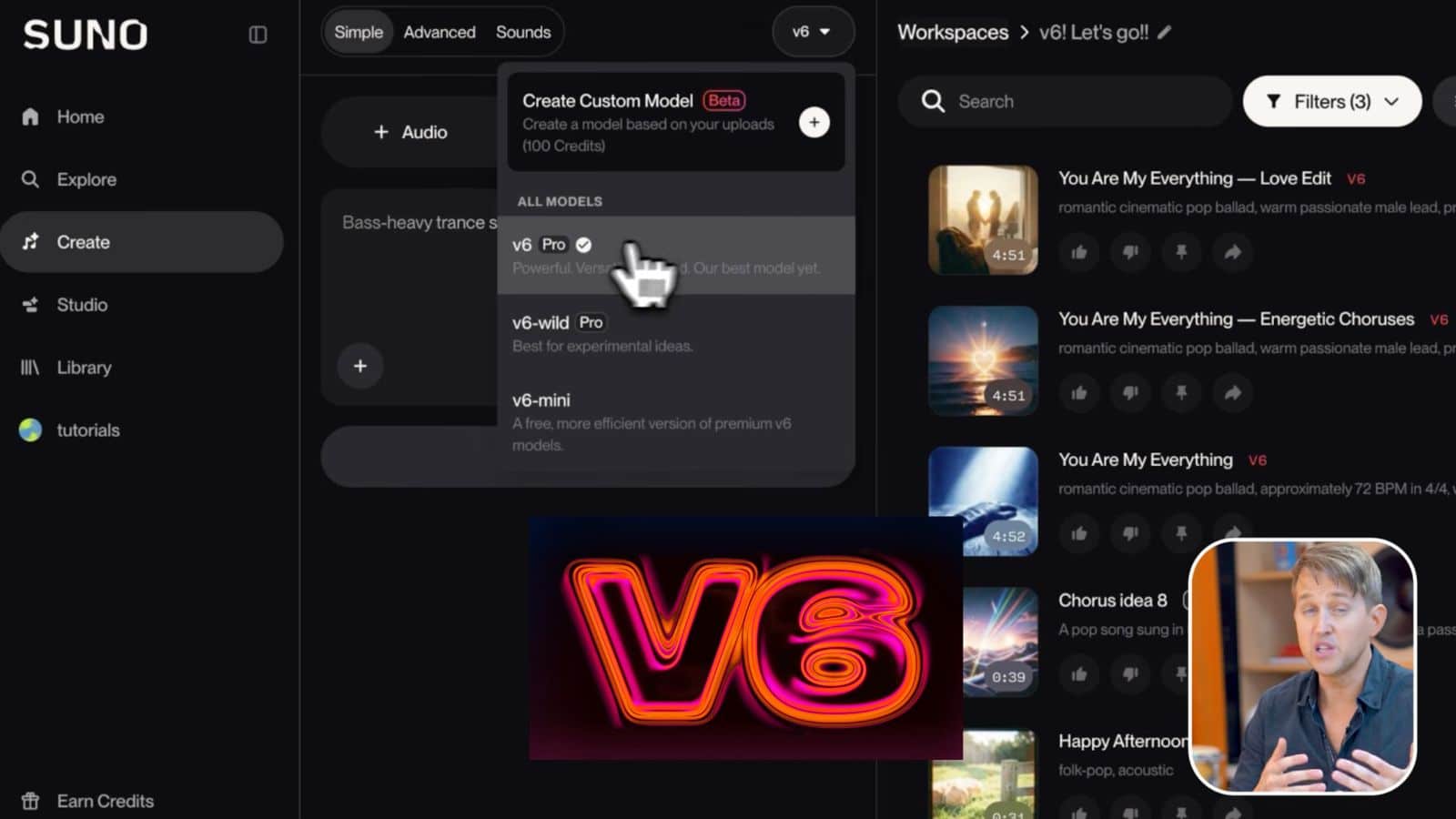
v6: the main model, balancing adherence to instructions with audio quality. Available on paid plans.
v6-wild: geared towards creativity, producing more unexpected results and well suited to exploring ideas. Available on paid plans.
v6-mini: a lightweight version for free accounts.
According to the company, this generation was retrained on licensed music data following agreements with the recording industry. This is an important legal change, not just an improvement in quality.
Quick selection guide: use v6 when you know exactly what you want, and v6-wild when you want suggestions for a new direction.
Custom Model
An experimental feature lets you create a custom model from your own music, giving new songs a consistent, distinctive style. The feature consumes credits and should only be used with recordings you hold the rights to. Uploading other artists' music to imitate them violates the terms and may break the law.
Studio 2.0
Launched in 8/2026, Studio is a browser-based music production environment, closer to recording software than a prompt box:
Arrange multiple tracks on a timeline.
Generate each part separately: drums, bass, vocals.
Work with MIDI, effects, parameter automation and built-in synthesizers.
Record vocals or real instruments, then let AI arrange the accompaniment.
Studio 2.0 is included in the Premier plan. For serious music creators, this is the main reason to choose the higher-tier plan.
Three plans and their download limits
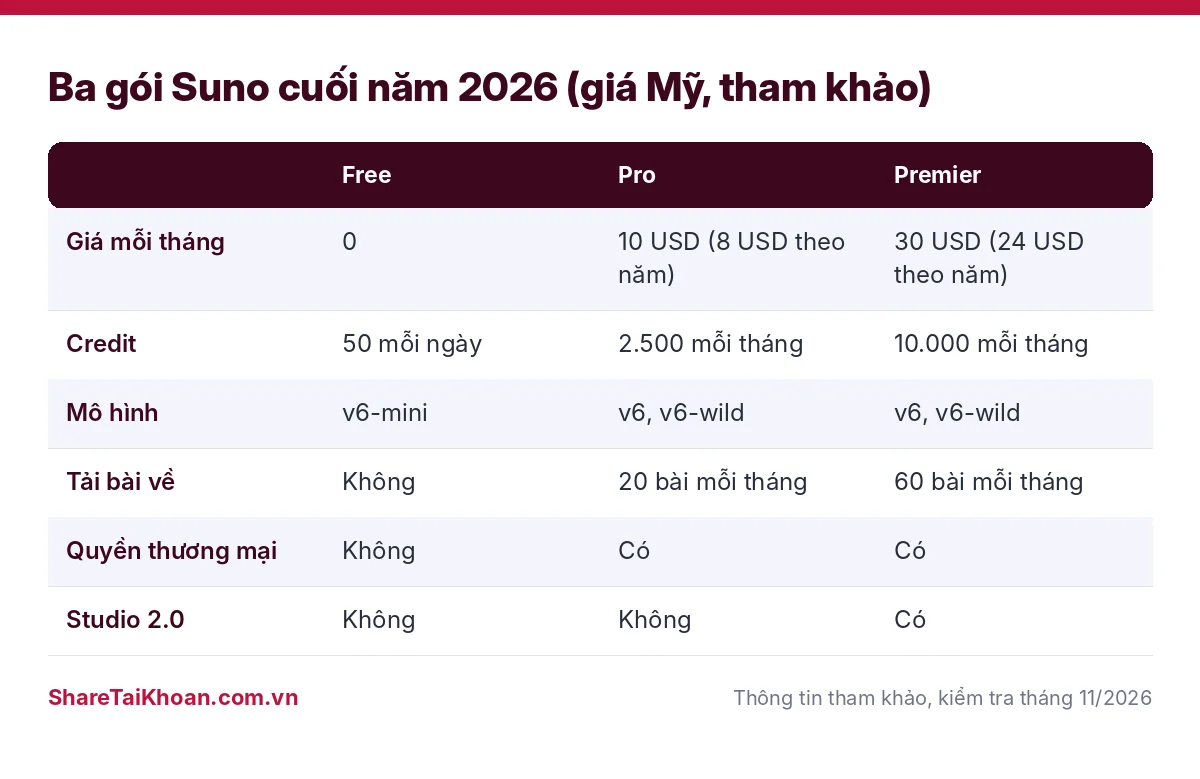
The most surprising change in 2026: from September, Suno imposes limit on the number of songs downloaded each month. Free accounts can only listen and share online, not download files. Pro and Premier have monthly limits. This changes how you use the service: you create multiple versions, but only download the tracks you actually choose.
Other differences between Pro and Premier include the number of credits, Studio and the number of stem types available when exporting individual parts.
Usage rights: read carefully before releasing music
Tracks created with a free account for non-commercial use only.
Tracks created while on a paid plan licensed for commercial use under Suno's terms. Upgrading later does not automatically grant rights to songs created while on the free plan.
Releasing music on streaming platforms: Suno offers distribution through partners. Each platform has its own rules for AI music, including labeling requirements.
Copyright protection: in many countries, works generated entirely by AI, without significant human creative input, may not qualify for copyright protection. Lyrics you write belong to you.
Accounts purchased through third parties: ask for clarification on who owns the account. Commercial rights are tied to the account that created the song; with Shared accounts, this may be unclear. Read the article Shared and Private accounts.
If you intend to earn money from your music, read the current terms and consider consulting a legal professional.
Choose a plan based on your needs
Trying it for fun, making music for friends: Free.
Background music for YouTube videos, TikTok and shop ads: Pro, because you need commercial rights and file downloads. Twenty tracks per month are enough for most content creators.
Musicians and producers who want detailed control over each track: Premier.
Need a large background music library with clear licensing, without having to compose: licensed music services such as Epidemic Sound simpler.
Suno in the content creation workflow
Writing prompts and structuring songs: see the article how to write Suno prompts.
Adding music to videos: see the article guide to creating music and videos with AI and prompt Veo 3.1.
Voiceovers: ElevenLabs or Vbee.
Vocal processing: Kits AI.
Frequently asked questions
Can you download music with a free Suno account?
Under the policy in effect since 9/2026, free accounts cannot download files. Check the help page, as the policy may change.
Can Suno v6 sing in Vietnamese?
Suno can create songs in Vietnamese. Pronunciation and tones can sometimes be off, especially with rare words; generate a few versions and choose the one with the clearest lyrics.
Can music created with Suno be used commercially?
Yes, for songs created while on a paid plan, under Suno's terms. Not for songs created with a free account.
Where can you buy Suno?
Xem Suno product page and other tools in AI Voice category.
References
ShareTaiKhoan is an independent service, not Suno or a representative of Suno. Prices, limits and terms are set by the provider and may change; the information in this article was checked in 11/2026.
(1 ratings - 5/5)
Buy affordable accounts at ShareTaiKhoan
Other articles
- When Is Black Friday 2026? Sale Schedule & Shopping Tips
- Is Gemma 5 Coming Soon? Google Makes AI 2.85 Times Faster
- Is Meta Muse Free? Plans and Terms of Use
- What is Udemy Business? A corporate training platform
- What is QuillBot? A guide to using QuillBot from A–Z
- What Is TurboScribe? How to Convert Audio, Video to Text
- What Is Otter AI? A Guide to Recording Audio, Converting Speech to Text
Comments (0)
Sign in or register to comment.
No comments yet.