
Kahoot or Wayground (Quizizz)? Choose Based on Your Lesson Style

Published:
First, the name: Quizizz changed its name to Wayground in mid-2025. Accounts, question sets, and the way students join with a code remain the same. So the familiar question “Kahoot or Quizizz?” is now “Kahoot or Wayground?” The two tools look similar, but they’re designed around two different learning paces—and that’s the best basis for choosing between them.
Kahoot or Wayground (Quizizz): choose based on the type of lesson, not habit
First, the name: Quizizz changed its name to Wayground in mid-2025. Accounts, question sets, and the way students join with a code remain the same. So the familiar question “Kahoot or Quizizz?” is now “Kahoot or Wayground?” The two tools look similar, but they’re designed around two different learning paces—and that’s the best basis for choosing between them.
The key difference: who sets the pace?
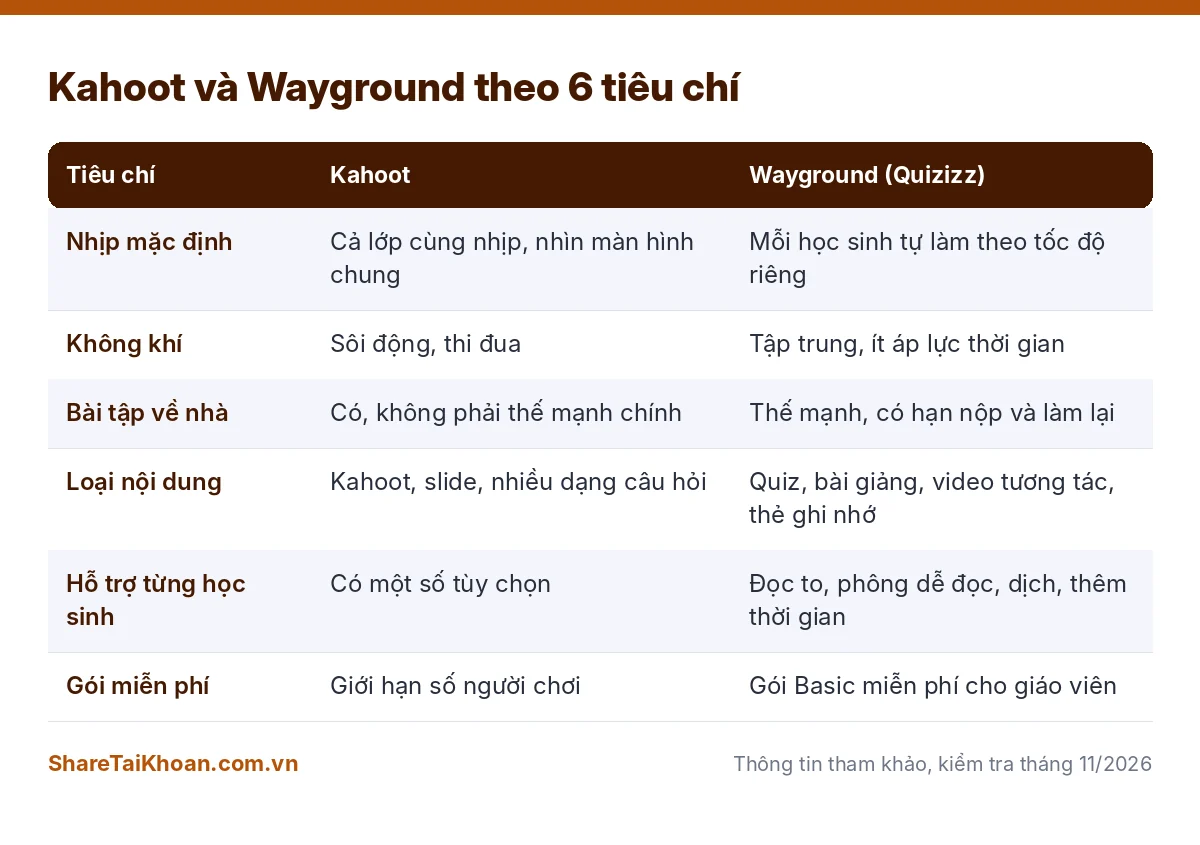
Kahoot Teacher-paced by default. Questions appear on the shared screen, the whole class answers at once, and a leaderboard appears after each question. The result is a competitive atmosphere, cheers, and the ability to pause and teach as soon as you see that many students got an answer wrong.
Wayground Student-paced by default. Questions and answers appear on each student’s device, and everyone works at their own pace. The result is less noise, less time pressure, and a natural fit for homework.
Both offer the other platform’s mode. But the default design shapes the experience in most lessons.
Compare them across 6 criteria
Each platform’s AI tools
Kahoot has tools for creating questions from a topic, a PDF, or a link, as well as a feature for inserting questions into slides. See the guide in the article create a kahoot with AI.
Wayground takes a learning-resource platform approach: AI creates quizzes, lessons, interactive videos, and flashcards from text, links, or files, and adapts existing content—for example, by changing the difficulty or translating it into another language. See the article Quizizz changes its name to Wayground.
Whichever platform you use, teachers should review all AI-generated questions before using them.
Costs and limits
Kahoot: The free plan limits the number of players per session and the range of question types. Individual plans for teachers are called Kahoot!+ and come at several price levels, starting at a few USD per month; higher-tier plans offer advanced AI and support more players.
Wayground: The Basic plan is free for teachers and includes most core features. Advanced AI features, deeper integrations with learning management systems, and detailed reports are included in paid plans for individuals or schools.
If your budget is zero, Wayground usually lets you do more. If your school already pays for Kahoot, make full use of its features before looking for another tool.
Choose based on 6 scenarios
A warm-up at the start of class to get everyone energized: Kahoot.
Reviewing for a test, with each student struggling with a different area: Wayground’s self-paced mode lets students retry incorrect answers.
Assign homework with a due date: Wayground.
A class with students who need individual support For students who read more slowly or use another language: Wayground, thanks to its per-student support options.
Events, extracurricular activities, parent meetings, internal training: Kahoot, because participants only need to look at the shared screen.
Teach online via Zoom or Google Meet: Both work; Wayground relies less on screen sharing because the questions appear on students’ devices.
Many teachers use both: Kahoot to kick things off and build excitement, and Wayground for practice and homework.
Don’t forget the most important part
Any tool is only as good as its question set. Three principles apply to both:
Test one idea per question, and make the distractors reflect common student misconceptions.
Review the report after each session: any question that more than half the class got wrong needs to be retaught.
Games are a means to an end. If students remember who won but not the content, slow things down and add more explanation.
Students who want to review on their own at home can use flashcards; see the article Quizlet Free, Plus, and Plus Unlimited.
Frequently asked questions
Are Quizizz and Wayground the same?
Yes. Wayground is the new name for Quizizz. Old links automatically redirect to the new address.
Which tool is better for free?
For teachers with large classes who need to assign work, Wayground’s free plan is usually more generous. Kahoot Free is a good fit for small groups.
Do students need an account?
Neither requires one. Students join with a code. With an account, they can save their progress.
Where can you buy an account?
Xem trang Kahoot and trang Quizizz Wayground. Article AI in education 2026 A roundup of more noteworthy learning tools.
References
ShareTaiKhoan is an independent service, not Kahoot! or a representative of Kahoot!. Prices, limits, and terms are set by the provider and may change; the information in this article was checked in 11/2026.
(1 ratings - 5/5)
Buy affordable accounts at ShareTaiKhoan
Related products


Other articles
- Is Google Antigravity or Cursor Better? Comparing Two AI IDEs
- Is Claude or ChatGPT Better? A Task-by-Task Comparison
- The latest Antigravity Ultra vs Antigravity Pro comparison
- CapCut Free vs CapCut Pro: Feature and Price Comparison
- Elicit AI vs Google Scholar 2026: Which Tool Should You Choose?
- Otter AI vs TurboScribe 2026: Which Tool Should You Choose?
- Elicit AI vs Consensus AI 2026: Which research tool should you choose?
Comments (0)
Sign in or register to comment.
No comments yet.