
The latest Antigravity Ultra vs Antigravity Pro comparison

Published:

Latest Antigravity Ultra vs. Antigravity Pro comparison 2026: AI models, features and pricing
How do Antigravity Pro and Antigravity Ultra differ? Which plan should you choose for AI-assisted coding, using Claude 4.6 or trying the latest Gemini 4 models?
The key difference lies in list of AI models available for access. According to the provided screenshots of the two account interfaces, Antigravity Pro includes Gemini 3.8 Flash, Claude Sonnet 4.6, Claude Opus 4.6 and GPT-OSS 120B. Meanwhile, Ultra adds Gemini 4 Hydrogen, Argon, Carbon, Neon and Orchestrator modes.
Together ShareTaiKhoan.com.vn compare benefits, limits, pricing and how to choose the right Antigravity plan in 2026.
Is Antigravity Pro or Ultra better? Quick verdict
Antigravity Pro is suitable for individual developers, students, freelancers and those who need AI assistance with everyday work. The plan includes Gemini 3.8 Flash, Claude Sonnet 4.6, Claude Opus 4.6 and GPT-OSS 120B options, according to the provided screenshot.
Antigravity Ultra is suitable for those who want to make use of more advanced AI models, especially the four Gemini 4 options Hydrogen, Argon, Carbon and Neon.
Ultra also displays Orchestrator (Neon), Orchestrator (Carbon) and Orchestrator (Argon) modes, providing more options for multi-step coding workflows.
If you mainly write code, fix bugs and develop websites, you can start with Pro. If you genuinely need the Gemini 4 model family or advanced orchestration modes, Ultra is more worth considering.
Note: The list above reflects the interfaces of the two accounts in the screenshots. Access may vary depending on the account, rollout status and Google policies.
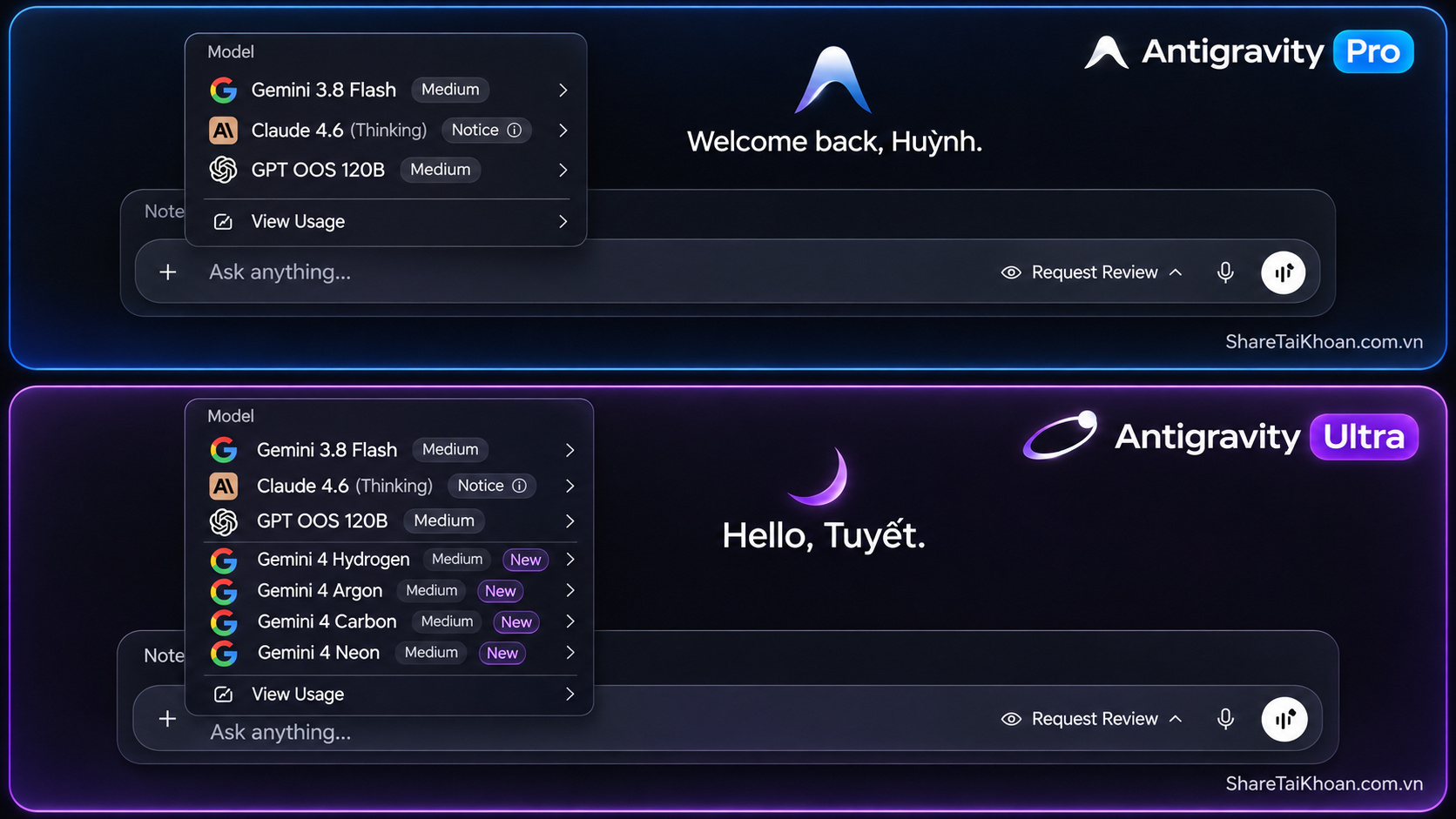
Latest Antigravity Pro and Ultra comparison table
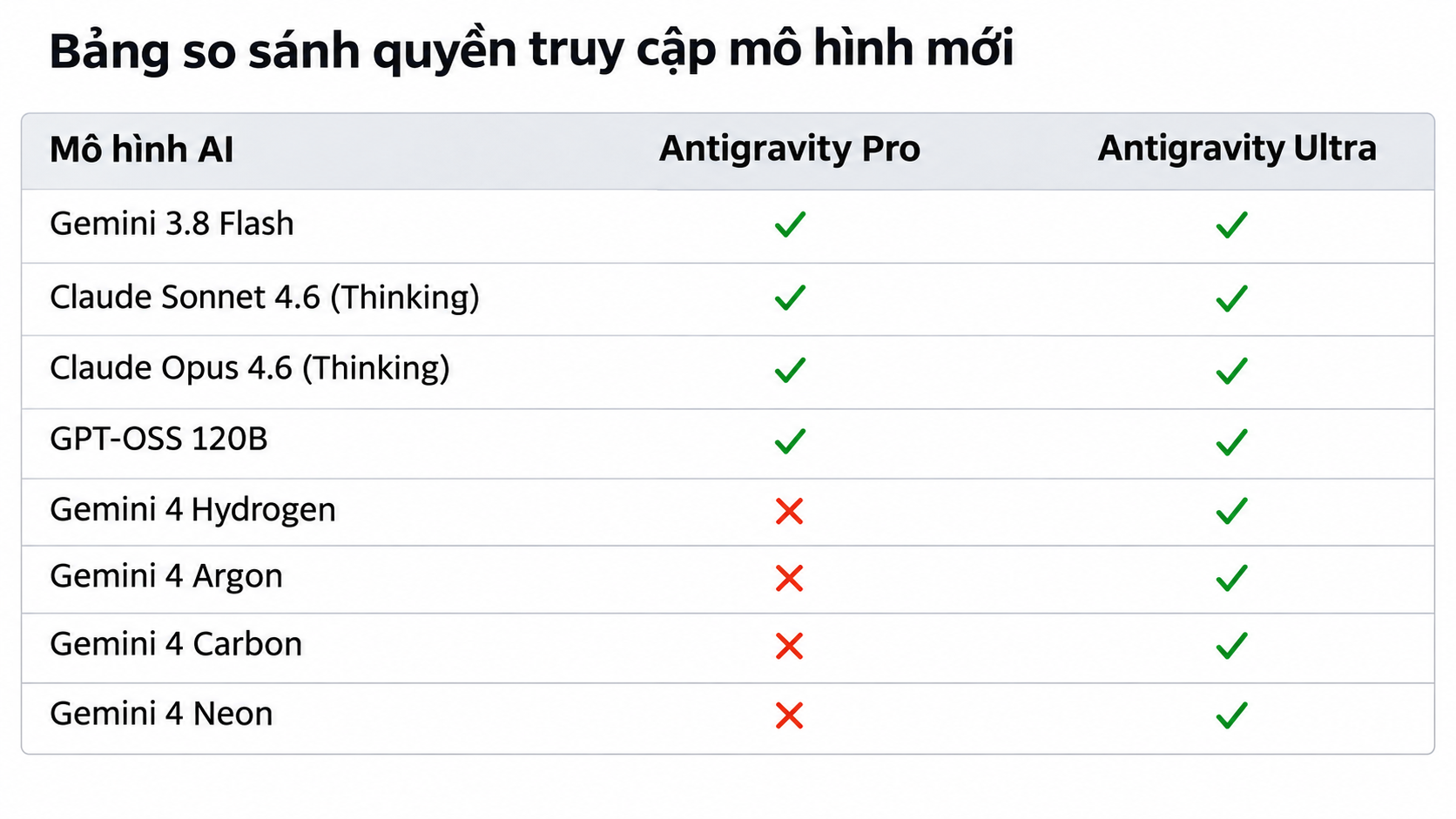
GPT-OSS 120B is listed in both images, but its entry in Ultra was grayed out at the time the screenshot was taken. Verify whether it can actually be selected before promoting it as an always-available benefit.
What is Google Antigravity?
Google Antigravity is a software development environment powered by AI agents, helping developers delegate tasks to AI to assist with building and testing applications.
Instead of simply asking AI to suggest a code snippet, users can assign broader tasks, such as:
Analyze the project structure.
Find bugs in the source code.
Suggest and implement changes.
Create new functionality.
Support for running tests.
Check the interface through a browser.
Explain the changes made.
For example, you can ask:
"Check this React project, identify why the login functionality isn't working, suggest a fix, and rerun the tests."
Antigravity can help carry out each step depending on the model and the permissions granted.
However, when working with important source code, you should still review the plan, check changes and only allow appropriate actions to be performed.
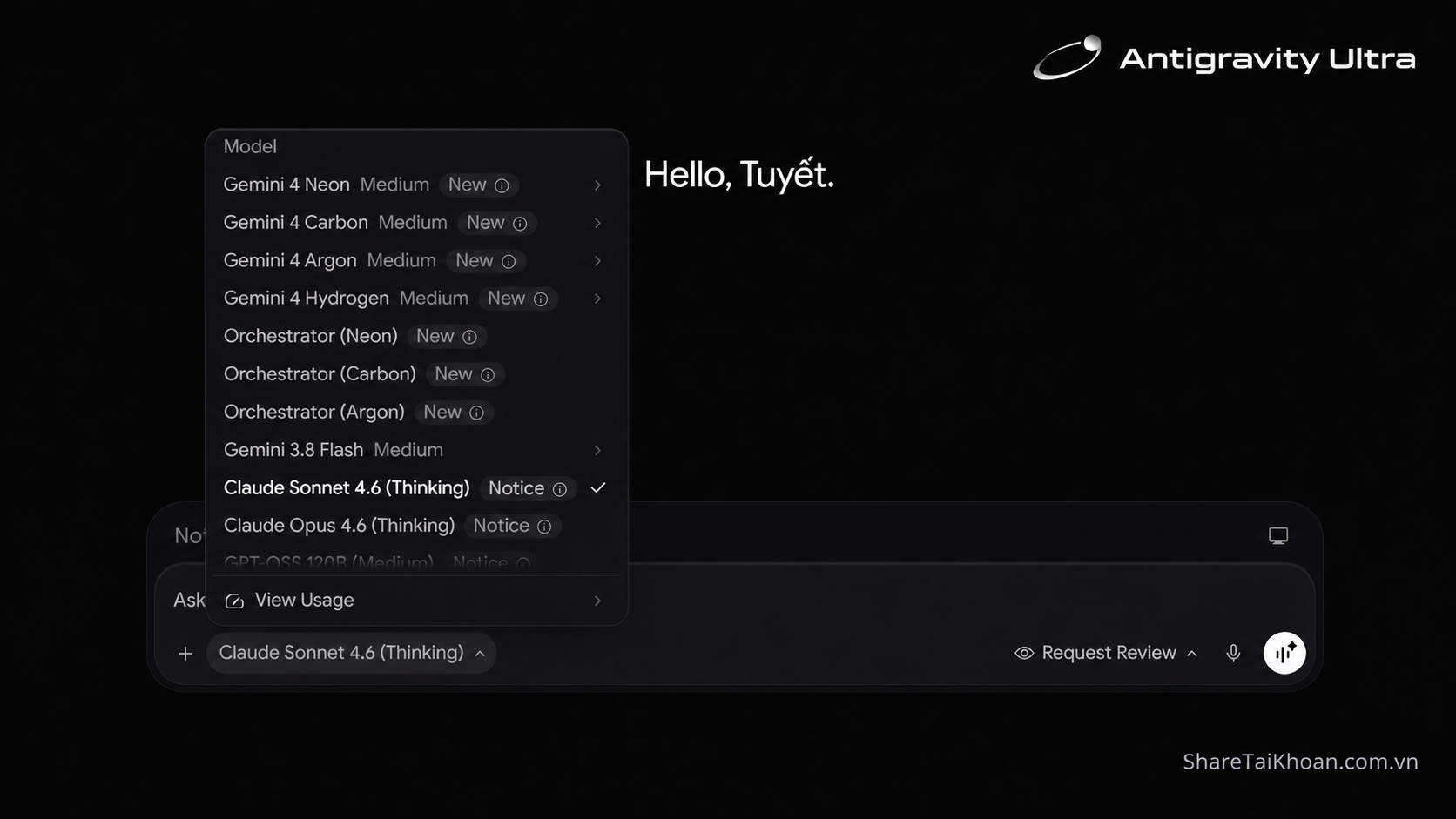
Which AI models does Antigravity Pro support?
Gemini 3.8 Flash
Gemini 3.8 Flash is an option within the Gemini ecosystem, suitable for testing programming requests and handling tasks with the supported level of reasoning.
In the image, the model is shown with the label Medium.
Claude Sonnet 4.6 (Thinking)
Claude Sonnet 4.6 is a notable option for those who want to use Claude to help write code, find bugs and analyse projects.
Claude Opus 4.6 (Thinking)
Claude Opus 4.6 appears in the same list, showing users another Claude option alongside Sonnet.
Depending on the task and usage limits, users can consider a model suited to the complexity of the work.
GPT-OSS 120B
GPT-OSS 120B also appears in the Pro list, with the label Medium and notifications Notice.
Before use, read the Notice for conditions or information related to the model.
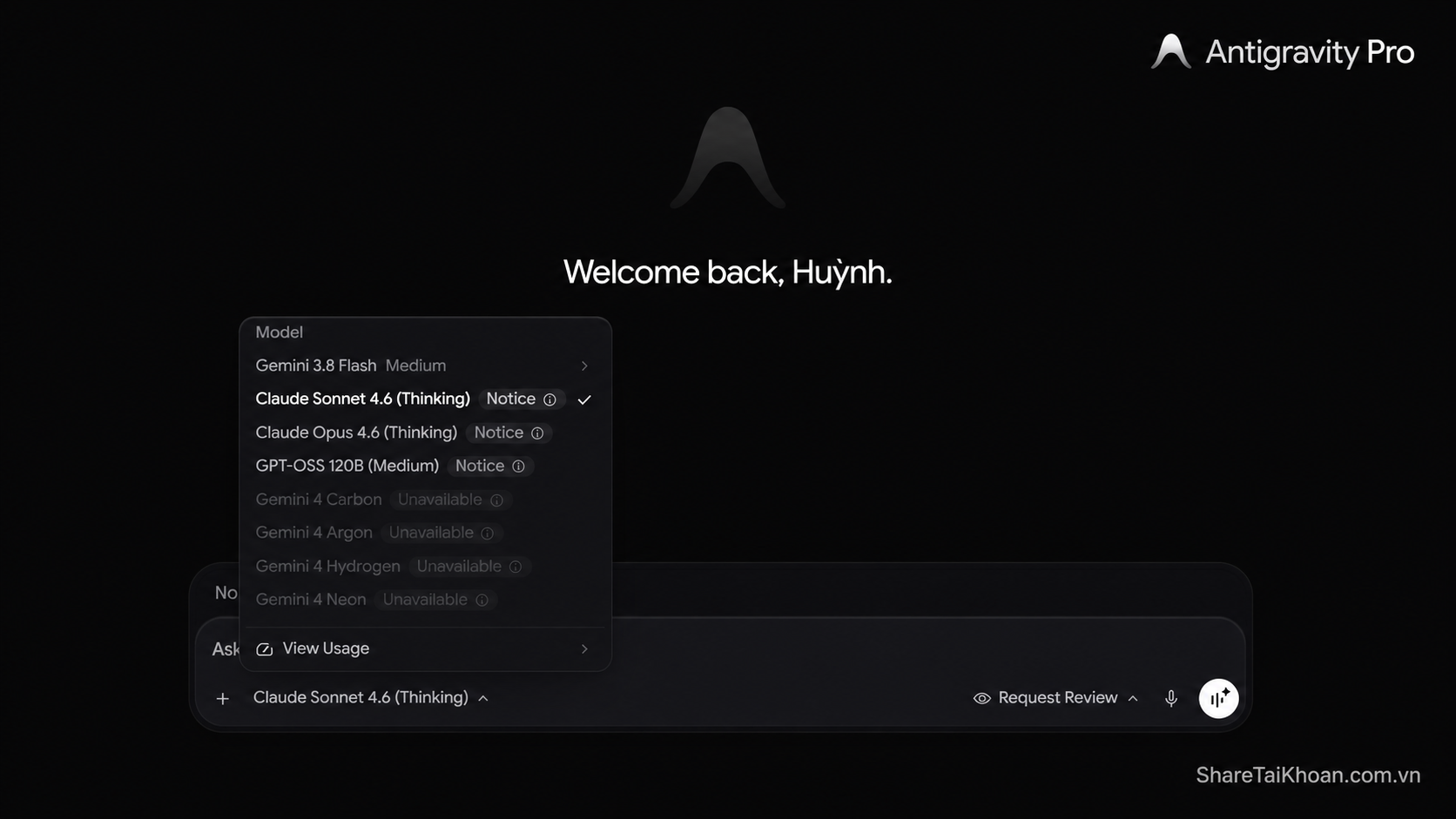
What makes Antigravity Ultra different?
Antigravity Ultra offers a wider selection of AI options than Pro in the two screenshots.
In addition to the listed Gemini 3.8 Flash, Claude 4.6 and GPT-OSS 120B groups, Ultra also displays four Gemini 4 models.
Gemini 4 Hydrogen
Hydrogen is one of the Gemini 4 models newly appearing in the Ultra interface, labelled New.
When choosing a model, you should check how well it handles your common tasks, its response speed and its actual usage limits.
Gemini 4 Argon
Gemini 4 Argon is also displayed in the Ultra list.
This is an option users can try for tasks that require analysis and multiple processing steps, but it should not be assumed to be the best model for every type of code.
Gemini 4 Carbon
Gemini 4 Carbon is one of the most notable differences between the two account screenshots.
In the Pro image, Carbon has an Unavailable status; in the Ultra image, the model appears with a New label.
Gemini 4 Neon
Gemini 4 Neon is also in the Ultra list, while it is unavailable in the provided Pro interface.
If you want to use Neon, check access to this model on your own account before subscribing.
Orchestrator modes on Ultra
In addition to the four Gemini 4 models, the Ultra screenshot also shows:
Orchestrator (Neon).
Orchestrator (Carbon).
Orchestrator (Argon).
These modes are displayed separately in the model selector. This is an advantage worth including in the comparison table because the Pro screenshot does not show the corresponding options.
However, the Orchestrator name in the interface alone is not enough to establish exactly how agents are allocated or how each mode processes tasks internally. Users should consult the documentation and actual results.
Usage limits and pricing for Antigravity Pro, Ultra
Besides model access, usage limits are an important factor when choosing a plan.
Google applies limits depending on the subscription tier, model and resource consumption. Therefore, Ultra's higher limits do not mean completely unlimited usage.
In particular, higher token limits should not be confused with proportionally faster response speeds.
Pricing at ShareTaiKhoan
According to the pricing table cross-checked against the product page on 20/11/2026:
Service plan | Format | Price |
|---|---|---|
Antigravity Pro – 1 month | Personal account upgrade | 299.000₫ |
Antigravity Ultra – 1 month | Shared | 299.000₫ |
Antigravity Ultra – 1 month | Personal account upgrade | 699.000₫ |
Antigravity Pro – 1 year | Personal account upgrade | 1.899.000₫ |
Antigravity Ultra – 1 year | Shared | 2.599.000₫ |
Antigravity Ultra – 1 year | Personal account upgrade | 6.900.000₫ |
These are service prices published by ShareTaiKhoan, not Google's official subscription prices.
View Antigravity Pro and Ultra pricing at ShareTaiKhoan
Why do both Pro and Ultra have a 299.000đ/month option?
Although they have the same price, the two options have different account delivery methods.
Pro 299.000₫: Described as a personal account upgrade.
Ultra 299.000₫: Described as a shared account.
Therefore, price alone should not be used to conclude that the two services offer equivalent administrative control, privacy levels or independent usage limits.
For a shared service, clearly verify the number of users, project access permissions, login conditions and compliance with Google's policies.
Official Google pricing
Google offers subscription options and usage limits for each Google AI plan. Prices may vary by market, promotional offer and billing cycle.
You should check directly at Google Antigravity pricing to determine the current official payment amount and benefits.
Should you choose Antigravity Pro or Ultra?
Not every user needs Ultra.
Needs | Option |
|---|---|
Learn programming | Pro or the free version is suitable |
Write website code | Pro |
Everyday application debugging | Pro |
Use Claude Sonnet 4.6 | Pro |
Use Claude Opus 4.6 | Pro |
Use Gemini 3.8 Flash | Pro |
Want to use Gemini 4 Hydrogen | Ultra |
Want to use Gemini 4 Argon | Ultra |
Want to use Gemini 4 Carbon | Ultra |
Want to use Gemini 4 Neon | Ultra |
Want to try the new Orchestrator modes | Ultra |
Need higher usage limits for intensive work | Consider Ultra |
When is Pro enough?
If your main work involves website development, writing scripts, fixing bugs and working on personal projects, you can start with Pro to evaluate its effectiveness.
Do not upgrade just because Ultra has more models.
When should you upgrade to Ultra?
Ultra is worth considering if you:
Genuinely need the Gemini 4 options.
Want to experiment with Orchestrator modes.
Frequently reach the usage limits of a lower-tier plan.
Need to compare multiple models on the same project.
Use AI Agents continuously in your workflow.
What matters is measuring the benefits in real-world work rather than relying solely on model names or the number of models.
How to check model access on Antigravity
Before purchasing or upgrading, check access permissions directly in the interface.
Step 1: Open Google Antigravity and sign in to your account.
Step 2: In the prompt input area, open the list Model.
Step 3: Check which models appear in the list.
Step 4: Distinguish between statuses such as:
New: The new model is displayed in the account.
Unavailable: The model is currently unavailable.
Notice: There is a notice to review before use.
Medium: The processing level label displayed alongside the model.
Step 5: Try selecting your desired model and performing a small task to confirm that it is usable.
Step 6: Choose View Usage to check limit information if the interface provides it.
Note that a model name appearing in the menu does not always guarantee that it can run successfully at all times.
Things to keep in mind when subscribing to Antigravity
Antigravity can be used to access source code and project resources, so security needs to be a priority.
Check management permissions: A Personal account upgrade and a store-provided account do not necessarily offer the same level of control.
Do not provide your main Google account password: Prioritize subscription methods that do not require you to disclose your password.
Protect client projects: Do not use an account accessed by multiple people to store source code or sensitive information without appropriate safeguards in place.
Check access to Gemini 4: If you are buying Ultra to use Hydrogen, Argon, Carbon or Neon, check each model directly.
Read the terms of use: Verify the legitimacy of access provided by a third party.
Confirm warranty coverage: Check which cases are covered by support, the available remedies and the refund conditions.
Frequently asked questions about Antigravity Pro and Ultra
Does Antigravity Pro include Gemini 4?
No. Only Antigravity has the Gemini 4 Hydrogen, Argon, Carbon and Neon models
Does Antigravity Pro include Claude Sonnet 4.6?
Yes. Claude Sonnet 4.6 (Thinking) appears in the list and is selected in the Pro screenshot.
Does Antigravity Pro include Claude Opus 4.6?
Yes. Claude Opus 4.6 (Thinking) is also listed in the Pro interface.
Which Gemini 4 models does Antigravity Ultra include?
The Ultra image shows Gemini 4 Hydrogen, Argon, Carbon and Neon, along with the corresponding Orchestrator options for Neon, Carbon and Argon.
Does Antigravity Ultra include GPT-OSS 120B?
GPT-OSS 120B appears in the Ultra list but was greyed out at the time of the screenshot. Users need to check its actual access status.
Does Antigravity Ultra offer unlimited usage?
You should not assume this. Google may apply limits based on the plan, model and resource consumption.
Is Antigravity Pro or Ultra more cost-effective?
If you do not need Gemini 4 or Ultra's usage limits, Pro may be a more economical choice. When comparing third-party prices, also consider account management permissions and terms of use.
Conclusion: Is Antigravity Ultra worth upgrading to?
Antigravity Pro already includes Gemini 3.8 Flash, Claude Sonnet 4.6, Claude Opus 4.6 and GPT-OSS 120B as options according to the interface provided. These are options worth considering for coding tasks and software development support.
Antigravity Ultra stands out more in terms of its model selection, adding Gemini 4 Hydrogen, Argon, Carbon, Neon and new Orchestrator modes.
If you mainly work with Claude or Gemini 3.8 Flash, evaluate Pro before upgrading.
If your goal is to use the Gemini 4 model family and you need more options for handling complex tasks, Ultra will be a better fit.
For details on plans, prices and service terms:
VIEW ANTIGRAVITY PRO AND ULTRA PRICING AT SHARETAIKHOAN.COM.VN
Website: https://sharetaikhoan.com.vn/
Zalo/WhatsApp: 0337 018 337
Email: cskh@sharetaikhoan.com.vn
ShareTaiKhoan is an independent service provider. Model access and account terms need to be verified before subscribing.
References
Two screenshots of the Antigravity Pro and Antigravity Ultra interfaces provided by the user, dated 20/11/2026.
Updated: 20/11/2026. The model access comparison table is based on the two account screenshots provided, not a guarantee covering every account or all Google policies.
(0 ratings - 0/5)
Buy affordable accounts at ShareTaiKhoan
Related products

Other articles
- Kahoot or Wayground (Quizizz)? Choose Based on Your Lesson Style
- Is Google Antigravity or Cursor Better? Comparing Two AI IDEs
- Is Claude or ChatGPT Better? A Task-by-Task Comparison
- CapCut Free vs CapCut Pro: Feature and Price Comparison
- Elicit AI vs Google Scholar 2026: Which Tool Should You Choose?
- Otter AI vs TurboScribe 2026: Which Tool Should You Choose?
- Elicit AI vs Consensus AI 2026: Which research tool should you choose?
Comments (0)
Sign in or register to comment.
No comments yet.