
Veo 3 Prompts: A 7-Part Formula and 20 Sample Prompts for Creating AI Videos

Published:

Veo 3.1 creates short clips with built-in audio: dialogue, sound effects and background music are generated alongside the visuals. This changes how you write prompts. You no longer describe just the visuals, but a complete shot, as if writing for a director. This article provides a reliable formula and 20 sample prompts you can adapt to your needs.
The Veo 3.1 prompt formula and 20 sample prompts by use case
Veo 3.1 creates short clips with built-in audio: dialogue, sound effects and background music are generated alongside the visuals. This changes how you write prompts. You no longer describe just the visuals, but a complete shot, as if writing for a director. This article provides a reliable formula and 20 sample prompts you can adapt to your needs.
The 7-part formula
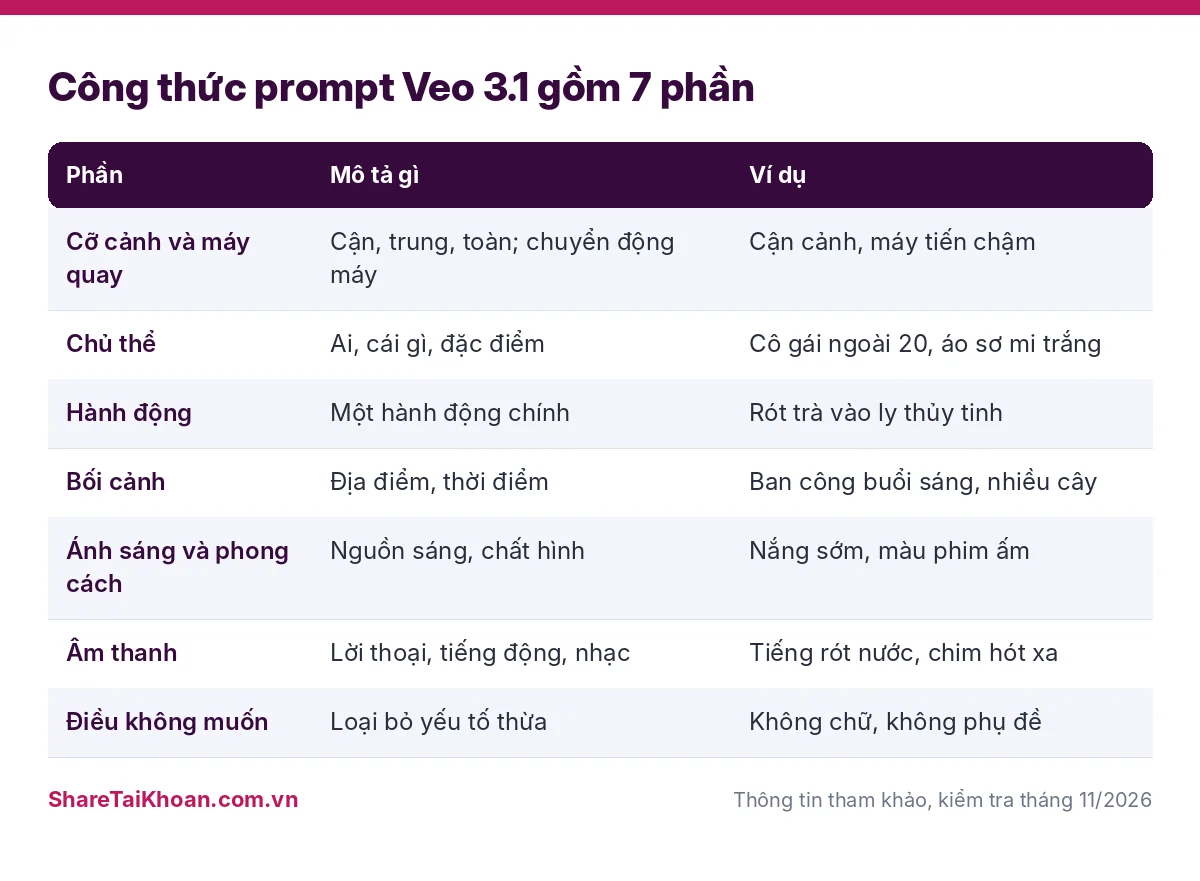
Three accompanying principles:
One action per clip. A clip lasts only a few seconds. Cramming three actions into one prompt makes all three fail.
Write in sentences, in chronological order. "The camera starts at... then..." is easier to understand than a list of keywords.
Describe what can be seen and heard. “Cozy atmosphere” is vague; “yellow lights, steam rising from a cup of tea” is clear.
Writing dialogue and sound
Put dialogue in quotation marks, clearly specifying who is speaking and in which language: The salesperson says in Vietnamese: "Please give it a try."
Keep dialogue under about 15 words for an 8-second clip. Anything longer will be rushed or cut off.
Describe sounds by their source: a knife chopping on a wooden cutting board, rain on a corrugated metal roof.
If you don't want music, write “no background music”.
Add "do not display subtitles" to prevent misspelled text from appearing on screen.
Vietnamese dialogue sometimes has incorrect tones or poor lip sync. For videos that need precise dialogue, many people generate visuals without dialogue and add a voiceover later.
5 common mistakes
The prompt is too short, leaving the model to guess the setting and lighting.
Requesting text, logos and prices to appear in the video. Add them using editing software instead.
Describing real people or copyrighted characters, resulting in rejection.
Changing the entire prompt after each attempt. Change one part at a time to see which part makes a difference.
Using the highest-quality mode from the start. Test ideas in fast mode, and only use the high-quality mode once the prompt is finalized.
20 sample prompts
Products and sales
Close-up, the camera slowly circles a glass perfume bottle on a wet black stone surface, studio lighting outlining the bottle, soft reflections. Sound: soft electronic music, no vocals. No text.
Medium shot, a hand opens a shoebox on a light-colored wooden table, takes out a pair of white trainers and sets them down. Sunlight from a window on the left. Audio: rustling paper, shoes being placed on wood. No music.
Close-up of moisturizer being swiped onto the back of a hand and then spread evenly, skin slightly glossy, pastel pink background. Soft lighting. Sound: quiet, upbeat background music.
Wide shot of a small milk tea counter, an employee in a blue shirt handing a drink to a customer and saying in Vietnamese: “Here you go, thank you.” Light ambient noise from a moderately busy shop. No subtitles.
Food
Close-up of hot broth being poured into a bowl of pho, steam rising, spring onions floating on the surface. The camera slowly moves forward. Sound: broth being poured, morning restaurant ambience.
Top-down shot, a hand sprinkling cheese onto a pizza fresh from the oven, cheese melting. Warm lighting. Sound: gentle sizzling.
Slow-motion close-up, coffee dripping from a Vietnamese filter into a glass containing condensed milk, blurred sidewalk café background. Sound: distant motorbikes, no music.
Medium shot, a chef tosses food in a pan over high heat in a restaurant kitchen, flames flaring up. Audio: pan clatter, the roar of flames.
Travel and landscapes
Aerial drone shot flying slowly over terraced rice fields during the ripe rice season at dawn, light mist in the valley. Sound: a gentle breeze, birdsong. Very quiet bamboo flute music.
Wide shot of an old town at dusk, glowing lanterns, a few pedestrians. The camera tracks sideways. Audio: distant street vendors calling out, footsteps.
Medium shot, a backpack-wearing traveller stands on a rocky outcrop overlooking the sea, hair blowing in the wind. The camera gradually pulls back. Audio: waves, wind.
Close-up of a kayak paddle cutting through turquoise water, limestone cliffs behind. Sound: the paddle splashing through the water.
Education and explainers
Flat animation, a seed sprouting into a plant through four stages against a cream background, smooth transitions. Sound: light, cheerful music. No text.
Medium shot, a teacher standing beside a whiteboard, looking directly at the camera and saying in Vietnamese: “Today we're learning about the water cycle.” Bright, quiet classroom. No subtitles.
A 3D model of Earth rotating slowly in space, the equator lighting up. Sound: a deep space ambience.
Close-up of a hand writing an equation in chalk on a blackboard, chalk dust falling. Sound: chalk on the board.
Short ads and social media
Vertical 9:16 frame, a young woman filming a selfie in a bright bedroom, holding up an insulated tumbler and saying in Vietnamese: “This keeps things cold all day long.” Natural, cheerful voice. No subtitles.
Vertical frame, before and after: a messy desk, a quick transition to a tidy desk with wooden shelving. Sound: a transition sound effect, upbeat music.
Close-up of a phone vibrating on a desk, its screen lighting up, a hand picking it up. Office lighting. Sound: vibration, distant typing. No text on the screen.
Wide shot of a group of young friends clinking glasses of soft drinks on a rooftop at sunset, laughing loudly. Slight handheld camera movement. Audio: laughter, quiet pop music.
From a clip to a complete video
Write a scene list first, with one prompt per scene, keeping the style and lighting sections consistent across scenes.
To keep characters consistent, use reference-image-to-video mode rather than relying solely on text descriptions.
Combine the clips in CapCut, add text and prices at this stage.
Frequently asked questions
Should prompts be written in Vietnamese or English?
Both work. Technical camera descriptions in English tend to produce more consistent results; write dialogue in the language you want the character to speak.
How many credits does a Veo 3.1 clip cost?
Depending on whether you use Lite, Fast or Quality mode. See the article Veo 3.1 pricing and the actual cost per video.
How does Veo 3 differ from Runway?
The blog already has an article Veo 3 and Runway comparison. See account options at Veo 3 product page.
References
ShareTaiKhoan is an independent service, not Google or a representative of Google. Prices, limits and terms are determined by the provider and may change; the information in this article was checked in November 2026.
(0 ratings - 0/5)
Buy affordable accounts at ShareTaiKhoan

Related products



Other articles
- Canva Pro or Photoshop? A Comparison for Marketing in 2026
- Runway Act-Two: Animate AI Characters Using Your Video
- Systematic Literature Reviews with Elicit: A 6-Step Process
- Semrush One and AI Visibility: Measuring Brand Presence in ChatGPT
- Create Natural-Sounding Vietnamese AI Voiceovers with Vbee: 7 Techniques
- How to Find Bestselling TikTok Shop Products with Kalodata
- Adding Voiceovers to Videos and Lectures with Vbee: A 6-Step Process
Comments (0)
Sign in or register to comment.
No comments yet.