
Create Natural Vietnamese AI Voiceovers with Vbee: 7 Techniques

Published:

Using the same voice on Vbee, some people produce readings as smooth as a broadcaster's, while others get flat, robotic delivery. The difference rarely lies in the tool. It lies in the input text. AI voices read exactly what you write, including parts written for the eye rather than the ear. The seven techniques below address each cause.
Make Vietnamese AI voices sound natural with Vbee: pauses, emphasis, numbers, and loanwords
Using the same voice on Vbee, some people produce readings as smooth as a broadcaster's, while others get flat, robotic delivery. The difference rarely lies in the tool. It lies in the input text. AI voices read exactly what you write, including parts written for the eye rather than the ear. The seven techniques below address each cause.
Choose a voice based on the content, not personal preference
Vbee has a large library with hundreds of voices, particularly regional Vietnamese voices. Before choosing, answer three questions:
Where are your listeners? Sales videos for customers in southern Vietnam should use a southern voice; general educational lessons typically use a standard northern voice.
What type of content is it? News needs a clear voice at a moderate speed. Stories need a warm, slow voice. Advertisements need a youthful, fast voice.
Will you use it long term? A YouTube channel should use the same voice throughout so viewers recognise it.
Test each voice with your own passage. The platform's sample sentences are always chosen to make the voice sound its best.
Write for the ear: short sentences, one idea per sentence
Written text often uses long sentences with multiple clauses. When it is read aloud, listeners cannot go back. Practical guidelines:
Keep each sentence under 20 words.
Put the main idea at the beginning of the sentence.
Replace "however, despite that" by splitting it into two sentences.
Read the draft aloud. Wherever you run out of breath, the AI voice will also sound strained.
Use punctuation to control pauses
Punctuation is the simplest tool for controlling rhythm:
Comma create a short pause. Add a comma before the part to emphasize: "Today only, get thirty percent off."
Full stop create a longer pause and lower the tone. Use after headings and concluding sentences.
Line breaks help clearly separate paragraphs.
For intentional long pauses, use the editor's pause insertion feature instead of typing multiple periods.
Avoid overusing exclamation marks and ellipses: many voices handle them inconsistently.
Write out numbers, dates, and units in words
This is the biggest source of errors in Vietnamese text-to-speech voices.
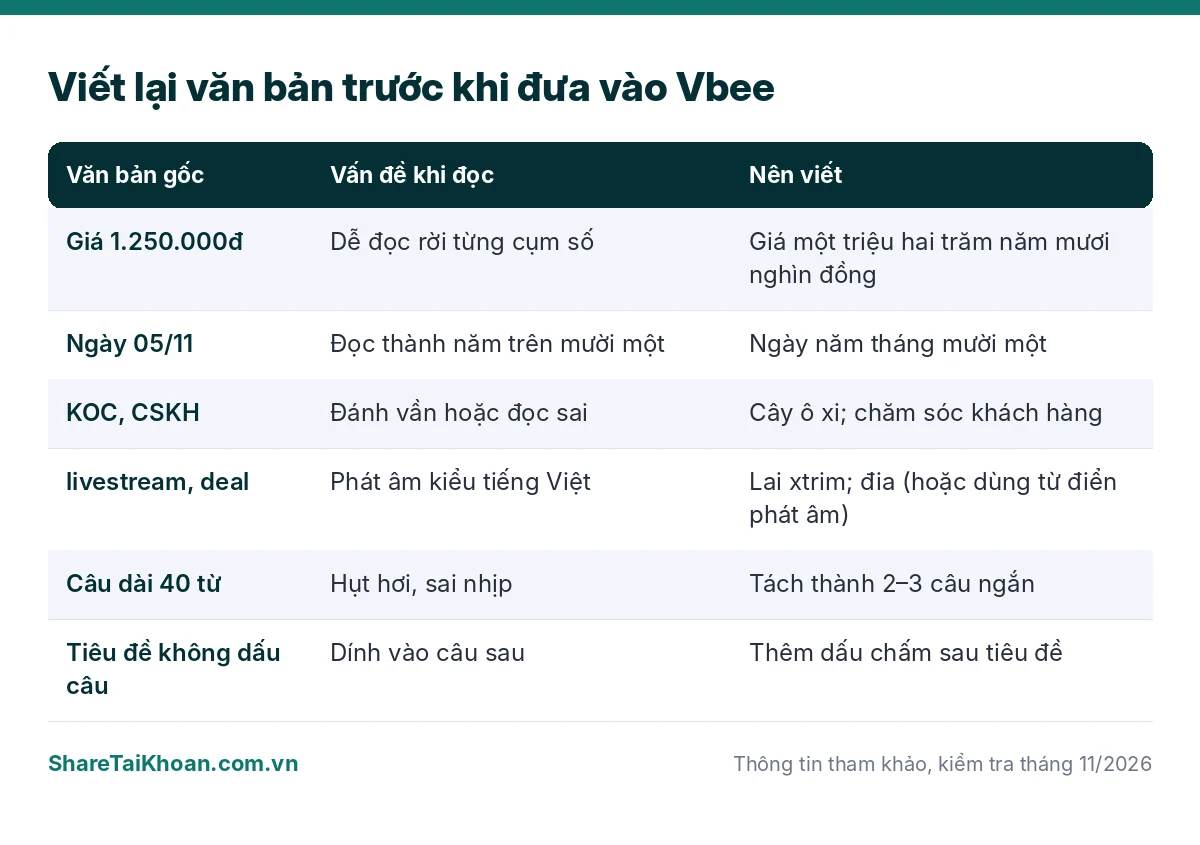
Rule: if something can be read in more than one way, write out exactly how you want it read. Separate phone numbers into groups using commas. Write percentages, currency symbols, and units of measurement in words.
Handle abbreviations and English words
Sales and technology content is full of loanwords. There are three approaches, in order of preference:
Replace it with a Vietnamese word when possible: use "live broadcast" instead of "livestream".
Use a pronunciation dictionary if your account has this feature: configure it once and apply it to every piece of content.
Spell it out phonetically directly in the text: write it the way you want it pronounced and listen back.
Brand names should be checked separately; a mispronounced name repeated ten times in a video can be very annoying.
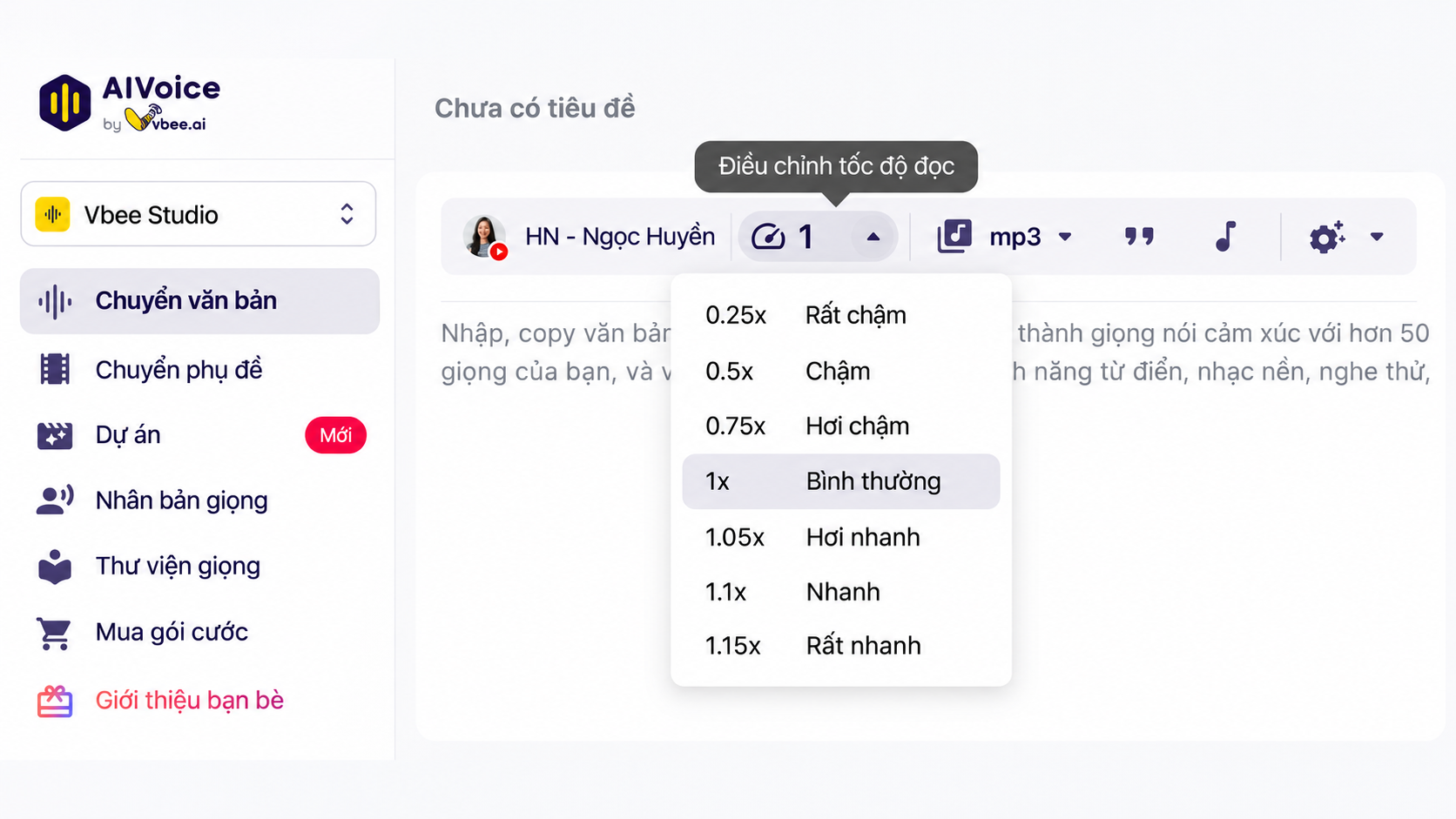
Adjust the speed to suit the content type
Lectures, tutorials: slightly slower than the default so listeners have time to retain the information.
Short videos, advertisements: slightly faster to maintain momentum.
Stories, meditation, podcasts: slow-paced with plenty of pauses.
Do not speed up to save time. Cut words instead.
Listen back using a checklist
Before exporting the file, listen to the entire recording once with headphones and mark the following:
Which words are mispronounced or slurred?
Where are the pauses too short or too long?
Are the figures and proper names correct?
Does the pitch rise for questions? If not, try rewriting them as shorter sentences.
Which passages are tiring to listen to? Split the sentences.
Regenerate only the section with errors, not the entire piece. Vbee counts characters, so making targeted corrections can save a substantial amount of your allowance.
Frequently asked questions
Can Vbee voices be used in commercial videos?
Usage rights depend on your plan. Check Vbee's terms for your current plan before running advertisements.
Which voice sounds the most natural?
There is no single answer. A voice suited to news may not suit storytelling. Testing it with your actual content is the only way.
Should you clone your own voice?
If you want your channel to have a distinctive identity, it is worth trying. Only clone your own voice or the voice of someone who has given written consent.
View account options at Vbee product page and read on video voiceover workflow using Vbee.
References
ShareTaiKhoan is an independent service, not Vbee or a representative of Vbee. Prices, allowances, and terms are determined by the provider and may change; the information in this article was checked in 11/2026.
(1 ratings - 5/5)
Buy affordable accounts at ShareTaiKhoan

Related products



Other articles
- Adding Voiceovers to Videos and Lectures with Vbee: A 6-Step Process
- Canva Pro or Photoshop? A Comparison for Marketing in 2026
- Runway Act-Two: Animate AI Characters Using Your Video
- Systematic Literature Reviews with Elicit: A 6-Step Process
- Semrush One and AI Visibility: Measuring Brand Presence in ChatGPT
- How to Find Bestselling TikTok Shop Products with Kalodata
- Using Perplexity for Keyword Research and SEO Competitor Analysis
Comments (0)
Sign in or register to comment.
No comments yet.